Home » Phone Utilities
Full Screen Caller ID PRO v9.2.3


Full Screen Caller ID PRO v9.2.3

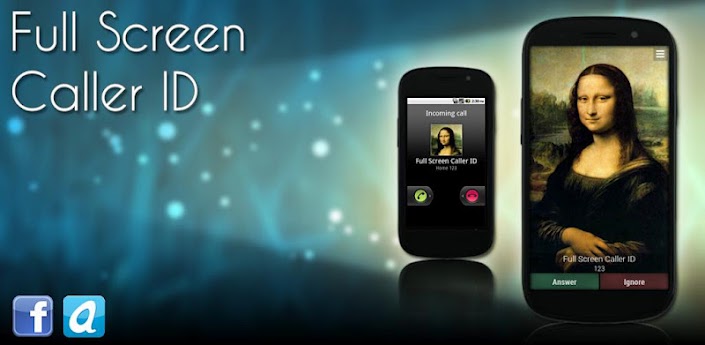
Overview :Full Screen Caller ID shows a full screen image of the person who is calling you.

The Full Screen Caller ID is a replacement caller screen for your Android Device.
Using this program you can customize the way your phone notifies you upon incoming & outgoing calls, sms, emails and missed calls.

--== Basic features ==--
- Full screen notification for incoming calls
- Full screen notification for outgoing calls
- Full screen notification for missed calls
- Full screen notification for incoming SMS
- Full screen notification for incoming mails
- Use pictures from sd card, internal camera or facebook
- Customize caller design : pick colors, text size of the notifications
- Text-to-speech : the full screen caller id can read out loud your incoming calls, sms and mails
- Facebook integration : pick pictures from facebook or link your contacts with your facebook friends to update all profil pictures with one click

--== Advanced features ==--
- Android integration : share pictures from any Android application to set pictures for your contacts
- Theme support
- Answer by buttons : no more slider to move to pick up the phone
- Answer by sliding the screen.
- Landscape support : high resolutions pictures can be set for both portrait and landscape mode.
- Backup and restore all settings and pictures.
- Video caller Id (beta)
- Block annoying contacts

--== How to use ==--
Please check the youtube video to learn how to use the software.
Full Screen Caller ID will work instantly once installed but you have to assign HD pictures to your contacts to

avoid full screen blurry pictures. HD pictures must be assigned from the Full Screen Caller ID menu, not from the

stock Android contact application.

What's in this version:
Version 9.2.3
- FIX : comment dialog's progress bar not displayed if email or comment is empty
- FIX : entering unlock code was always return "server unavailable" on some devices
- UPDATE : removed paypal paiement option to comply with Google Play Developer Program Policy
- UPDATE : application is now 100Kb lighter


Requirements : Android OS 1.5+

Download:
http://filedefend.com/cvud0vdigdf3/f923.apk

Mirror:
http://rapidgator.net/file/36178880/f923.apk.html


Please Post Your Suggestions.


Read More!
BetterBatteryStats v1.10.0.0


BetterBatteryStats v1.10.0.0

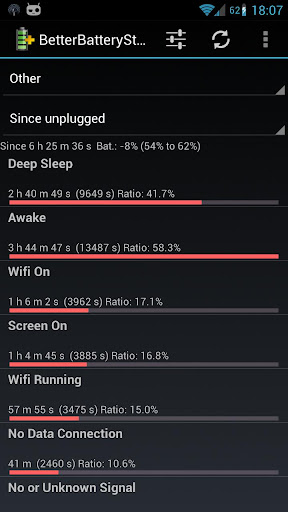
Overview :A high battery drain is often a limiting factor for a great user experience.

With BetterBatteryStats you can analyse the behavior of your phone, find applications causing the phone to drain battery while it is supposed to be asleep and measure the effect of corrective actions:
- Spot drainers based on detailed information about the root cause
- Use the online Knowledge-Base to find how to reduce or remove the wakelocks
- measure the effect of actions to reduce drain
- detect changes in the awake/sleep profile and quickly find the causes (rogue apps)

In other words BetterBatteryStats helps you to get the best out of your Android smartphone.

Support:
Please don't use the market's feedback system for support. In case of issues or for any question or suggestion please contact me by e-mail or use the contact information from the about box.
Litening ROM users: if you have a pre-installed version you must delete it from /system/app prio to installing it from the market.

Keywords: wakelock, kernel wakelock, partial wakelock, reduce battery drain, optimize battery life, save battery, battery drain, saving battery

Permissions:
- android.permission.WRITE_EXTERNAL_STORAGE is used only for writing dumps to the SD. In case you don't need that feature please fell free to remoke that permission. It won't have any side effect besides disabling that feature
- android.permission.BATTERY_STATS is obviously the permission to access the internal statistics and can not be revokes without making the app unusable
- android.permission.INTERNET is required to access the online Knowledge-Base and Google Analytics. If you want to revoke this permission please make sure that the KB and GA are disabled in the preferences
- android.permission.ACCESS_NETWORK_STATE is required for Google Analytics. You can opt-out from GA from the "Advanced Preferences" and revoke this permission
- android.permission.RECEIVE_BOOT_COMPLETED is required for cleaning references. Revoking this permission may affect the results of kernel wakelocks and custom reference until new references were saved
- android.permission.READ_PHONE_STATE is required to detect when the phone was turned on/off in order to store references for advanced diagnosis
- android.permission.DEVICE_POWER is required to detect when the phone is disconnected from the charger and store the corresponding kernel wakelock reference. Revoking this permission will lead to losing "since unplugged" in kernel wakelocks


BetterBatteryStats is open source so you can inspect/review/ contribute and submit issues or feature requests. Please check the about dialog for further details.

What's in this version:
- Added battery drain to on screen battery info
- Added raw cpu states
- Added "since boot" reference
- Prevent (inconsitent) stats while plugged in
- Added icons to stats having package info, clicking icon starts application settings
- Workaround to SuperUser obcessing about asking for rights
- Stats requiring root (alarms/network) are disabled by default
- Reorganized menu


Requirements : Android version 2.1 and higher

Download:
http://filedefend.com/l0647v3z1fjo/b100.apk

Mirror:
http://rapidgator.net/file/36484379/b100.apk.html
http://turbobit.net/k145gybr6orj.html

Please Post Your Suggestions.


Read More!
Voice Speed Dial v1.2.16


Voice Speed Dial v1.2.16

Overview :Imagine the convenience of calling your friends and family without having to look up their phone number or dial. Cyberon Voice Speed Dial puts you in control using the power of your voice.

This innovative app is the perfect solution to make calls without needing your hands – when you're driving, walking, exercising, or doing other tasks. Cyberon Voice Speed Dial even allows you to use your Bluetooth headset (for Android 2.2 or above) to make calling safer when you're driving.

The voice recognition is highly accurate because you create a "voice tag" in advance for each person you would like to call. It's quick, easy, and allows the app to recognize virtually any voice (there is no language barrier).

Just say someone's name... the app will quickly recognize your speech and dial that person for you. No more searching through your address book or trying to remember a phone number!

MAKE PHONE CALLS JUST BY SPEAKING

Benefits of Cyberon Voice Speed Dial include:

* Make phone calls using your voice - The app listens to you for hands-free dialing
* Easy to use - It's so convenient that you'll want to use it every time you call, even when your hands are free
* Save time - No need to look up someone's phone number or search for their name in your phone
* Make calling while driving safer - Avoid distraction with this simple, hands-free solution
* No more wrong numbers - The voice recognition is fast and accurate because it is based on your actual speech
* Perfect for busy professionals - Always on the go? Now, talking with your clients and colleagues will be easier
* No language barrier - The app will recognize virtually any voice, without language limitations. The app's display supports 20 languages

ADDITIONAL INFORMATION

To enable Bluetooth hands-free voice dialing, please make sure to check these items:
1. Make sure that the platform of your phone is Android 2.2 (Froyo) or above, and your headset supports Bluetooth hands-free profile.
2. Restart your phone after installing Cyberon Voice Speed Dial.
3. Re-pair your Bluetooth headset and phone after installing Cyberon Voice Speed Dial, if they have been paired.

What's in this version:
2012.08.21
Resolve the app could not go to setting page on android 4.0.3


Requirements : Android OS 1.6 +, LuckyPatcher

Download:
http://rapidgator.net/file/34649863/l1216.zip.html

Mirror:
http://turbobit.net/59exvfn9i52x.html
http://filedefend.com/rz4ir7exdpnd/l1216.zip


Please Post Your Suggestions.


Read More!
Easy Battery Saver v3.2.3 AdFree


Easy Battery Saver v3.2.3 AdFree

Overview :Save power, extend battery life and perfect experience of using phone with Easy Battery Saver!

Does your phone always need charging, even once a day?
Does your phone always die at crucial moment due to running out of battery?
Want to find a perfect solution?
Now is your answer!

Save power, extend battery life and perfect experience of using phone with Easy Battery Saver!

Easy Battery Saver is a powerful yet easy to use power manager app specifically designed to extend battery life and optimize using habit.

Easy Battery Saver saves your battery by intelligently dealing with phone’s network connectivity, screen time out and screen brightness. What’s more, the considerable sleep schedule setting will save your battery when you are sleeping.

Easy Battery Saver is easy to use by four preset saving modes and advanced customized mode. Just choose one mode, the battery problems will go away.

General Saving Mode, it has the basic network control, screen control and the sleep schedule to meet your normal battery saving needs.
Intelligent Saving Mode, it has the eight different controls and runs intelligently to save more battery than general saving mode.
Super Power Saving Mode, it can keep your phone's standby time as long as possible; you won't have to worry about whether your phone dies at crucial moment due to running out of battery any more.
Advanced Customized Mode, it is the best choice for fanciers; you can set all the values as you like, let your phone running in your way. The more, waiting for you to find!
Normal Mode, it will do nothing for your battery.

Also, tutorials in Easy Battery Saver will tell you how to deal with multi tasking and how to charge your battery healthily.

No matter what the situation, no matter who you are, Easy Battery Saver can always find a suitable solution for you.

Just have a try, you’ll find it really a good assistant! It is free!

HIGHLIGHTS:
- EASY TO USE
* Optional modes that is easy to choose
* Visualized battery status on main page

- EFFECTIVE
* Save more than 50% battery
* Extend the battery working life

- CONSIDERABLE
* Battery consumption list of real-time running items
* Simple, interactive and helpful tutorial
* Notice of how to use battery better

KW:Battery, Saver, Savior, Boost, Save, Drain, Juice Defender, Battery Booster, Easy

Recent changes:
* Fix some bugs
* Remove-ads reward
Less description »

Latest version: 3.2.3 (for Android version 2.1 and higher)


Requirements : Android v2.1+

Download:
http://rapidgator.net/file/34194592

Mirror:
http://turbobit.net/bs6xkvhsb97o.html
http://depositfiles.com/files/2eczi4n74

Please Post Your Suggestions.


Read More!
Full Screen Caller ID PRO v9.2.1


Full Screen Caller ID PRO v9.2.1

Overview : The Full Screen Caller ID is a replacement caller screen for your Android Device.
Using this program you can customize the way your phone notifies you upon incoming & outgoing calls, sms, emails

and missed calls.

--== Basic features ==--
- Full screen notification for incoming calls
- Full screen notification for outgoing calls
- Full screen notification for missed calls
- Full screen notification for incoming SMS
- Full screen notification for incoming mails
- Use pictures from sd card, internal camera or facebook
- Customize caller design : pick colors, text size of the notifications
- Text-to-speech : the full screen caller id can read out loud your incoming calls, sms and mails
- Facebook integration : pick pictures from facebook or link your contacts with your facebook friends to update all profil pictures with one click

--== Advanced features ==--
- Android integration : share pictures from any Android application to set pictures for your contacts
- Theme support
- Answer by buttons : no more slider to move to pick up the phone
- Answer by sliding the screen.
- Landscape support : high resolutions pictures can be set for both portrait and landscape mode.
- Backup and restore all settings and pictures.
- Video caller Id (beta)
- Block annoying contacts

--== How to use ==--
Please check the youtube video to learn how to use the software.
Full Screen Caller ID will work instantly once installed but you have to assign HD pictures to your contacts to

avoid full screen blurry pictures. HD pictures must be assigned from the Full Screen Caller ID menu, not from the

stock Android contact application.

What's in this version:
Version 9.2.1
- FIX : better support for right to left langages
- FIX : slider theme not working


Requirements : Android OS 1.5+

Download:
http://rapidgator.net/file/34251375/f921.apk.html

Mirror:
http://turbobit.net/0nqe8pcotlem.html
http://filedefend.com/13gwko7dzd54/f921.apk


Please Post Your Suggestions.


Read More!
Full Screen Caller ID PRO v9.2.0


Full Screen Caller ID PRO v9.2.0

Overview : The Full Screen Caller ID is a replacement caller screen for your Android Device.
Using this program you can customize the way your phone notifies you upon incoming & outgoing calls, sms, emails

and missed calls.

--== Basic features ==--
- Full screen notification for incoming calls
- Full screen notification for outgoing calls
- Full screen notification for missed calls
- Full screen notification for incoming SMS
- Full screen notification for incoming mails
- Use pictures from sd card, internal camera or facebook
- Customize caller design : pick colors, text size of the notifications
- Text-to-speech : the full screen caller id can read out loud your incoming calls, sms and mails
- Facebook integration : pick pictures from facebook or link your contacts with your facebook friends to update all profil pictures with one click

--== Advanced features ==--
- Android integration : share pictures from any Android application to set pictures for your contacts
- Theme support
- Answer by buttons : no more slider to move to pick up the phone
- Answer by sliding the screen.
- Landscape support : high resolutions pictures can be set for both portrait and landscape mode.
- Backup and restore all settings and pictures.
- Video caller Id (beta)
- Block annoying contacts

--== How to use ==--
Please check the youtube video to learn how to use the software.
Full Screen Caller ID will work instantly once installed but you have to assign HD pictures to your contacts to

avoid full screen blurry pictures. HD pictures must be assigned from the Full Screen Caller ID menu, not from the

stock Android contact application.

What's in this version:
Version 9.2.0
- UPDATE : now support multiple theme for one apk
- ADD : new "slider" theme built in with the FSCI application
- ADD : new crop picture activity with action bar
- ADD : new ability to edit picture during cropping using FSCI Aviary Plugin
- UPDATE : now let user choose between internal application or android application to take pictures


Requirements : Android OS 1.5+

Download:
http://www.filecloud.ws/fydf5ojmquek

Mirror:
http://www.MegaShare.com/4487103
Please Post Your Suggestions.


Read More!