Home » GPS
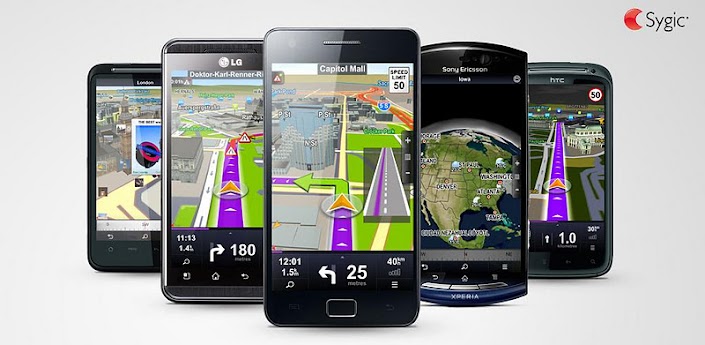
Sygic: GPS Navigation v14.3.2


Sygic: GPS Navigation v14.3.2


Overview :THE MOST DOWNLOADED OFFLINE NAVIGATION APP IN THE WORLD!

HIGHLIGHTS
➤High quality TomTom maps stored on the phone
➤Works with GPS only, internet is not needed
➤Turn-by-Turn voice guided navigation
➤Spoken Street Names to focus on the road
➤Three Alternative Routes to choose from
➤Waypoints for places you want to visit
➤Dynamic Lane Guidance to know the right lane
➤Junction View to understand intersections
➤Speed Limit Display to protect your wallet
➤Speed Camera Warnings for Speedy Gonzales
_______________________________________
BENEFITS
➤Free Updates: maps, premium POI, speed cams
➤3D Cities & Landscape for easy orientation
_______________________________________
SAFETY AND USER COMFORT
➤Sharp Curve Warnings for added safety
➤Notification of Upcoming Speed Limit Change
➤Avoid Toll Roads on part or on entire route
➤Avoid Roadblocks, Motorways …
➤Pedestrian Navigation to walk and explore
➤Compass & Stopwatch for outdoor activities
_______________________________________
SYGIC PLACES
➤Exclusive POIs as free download in My Sygic
➤TripAdvisor, Booking.com & many more
_______________________________________
GREAT SEARCH
➤Google™ Local Search to find anything
➤Find and Navigate to
· Address
· Contact
· POI
· Postal code
· Intersection
· GPS coordinates
· Geo tagged photo
· Home
_______________________________________
APP THAT IS PERSONAL
➤Import of interesting locations - POIs
➤Customizable navigation screen
➤Road Incident Sharing with other drivers
➤SOS/Help to find assistance nearby
➤Customizable spoken warnings
➤Friends on the map
_______________________________________
COMPATIBLE TO THE MAX
➤Smooth Hardware Accelerated 3D rendering
➤Car Audio Integration – Bluetooth or cable
➤Graphics optimized for tablet & HD displays

This app has NO advertisements

Requirements : 2.0.1+

Download:
http://ul.to/nxidngpn

Mirror:
https://www.oboom.com/Q499IQLU
https://www.filemonkey.in/file/mwgkg3dibtxe8a6p

Instruction:
1. Copy Sygic folder to root SD
2. Add maps. voice,...
3. Install APK

BASEFILES:
http://ul.to/jch1fnq3
http://ul.to/02mx5rqr

https://www.oboom.com/I5ZZ0Z45
https://www.oboom.com/JZSPF9MN

https://www.filemonkey.in/file/r9stsqao8uwkohhr
https://www.filemonkey.in/file/n9uxz4f51tk36xix


Please Post Your Suggestions.


Read More!
ROUTE 66 Maps + Navigation v5.11.47.B444740.B3A7AB8


ROUTE 66 Maps + Navigation v5.11.47.B444740.B3A7AB8

Overview :GPS-based mapping and navigation app with Follow Me™ augmented reality navigation.

FREE MAP VIEWER:
+ Instant access to over 100 maps
+ Browse maps, search, calculate and simulate routes: it is all free!
+ The latest, up-to-date maps from top-rated map suppliers like TomTom, AutoNavi, Sensis
+ Free map updates
+ Works both with server based maps and maps stored on your phone
+ Download maps directly to your phone, no computer needed
+ Smart caching of map data: never download a map segment twice
+ High resolution 3D content in hundreds of cities around the world
+ Tap any point on the map and start route calculation straight away
+ Automatic switch between day and night colours, choose custom map colours
+ Access Wikipedia and local weather reports directly from the map
+ Powerful map 3D rendering with full hardware acceleration
+ Multi-touch map browsing: smooth and easy
+ Maps optimised for high resolution displays and tablets
+ Directly call a Point of interest or visit its website
+ Share your favourite locations with friends

PREMIUM NAVIGATION FEATURES:
+ Turn-by-turn voice guided navigation with uncluttered visual guidance
+ 2D, 3D and Augmented Reality navigation
+ Drive or walk: always the best route
+ Choose between Fastest route and Shortest route
+ Add waypoints to your route at any time
+ Plan your trip ahead, your routes are automatically saved
+ Navigation shortcuts: easy access to key functions during your trip
+ Adjust the navigation display to your own preferences
+ Lane Guidance
+ Adjustable speed warnings
+ Real Time Traffic information with dynamic route recalculation (in-app purchase)
+ Speed camera warnings with automatic database updates (in-app purchase)
+ Compass enhanced pedestrian navigator: map always pointing in the right direction
+ Fully interactive maps, even during navigation
+ Voice guidance available in 59 different languages and dialects
+ Voice guidance continues when app is in background
+ Try all premium features like Navigation, Traffic information and Speed cameras for FREE before you buy a licence

SEARCH WITH EASE:
+ Unique ROUTE 66 free text search: search any address, post code or point of interest
+ Free text search works even with partial or incomplete search requests
+ Turn a location into a personal Favourite with one tap
+ Full Search History
+ Address search lets you also find intersections
+ Search along route: find a nearby gas station or parking spot at your destination
+ Find any address stored in your Contact database
+ Search worldwide without having to download maps first!

WORLDWIDE COVERAGE:
Maps and navigation supported in these countries:
+ Africa: Egypt, Lesotho, Morocco, Nigeria, South Africa, Swaziland
+ Asia: Bahrain, Brunei, China, Hong Kong, Indonesia, Kuwait, Macau, Malaysia, Oman, Philippines, Qatar, Saudi Arabia, Singapore, Taiwan, Thailand, United Arab Emirates
+ Oceania: Australia, New Zealand
+ Americas: Argentina, Brazil, Canada, Chile, Guadeloupe, Martinique, Mexico, Puerto Rico, United States, Uruguay, Virgin Islands (United States)
+ Europe: Albania, Andorra, Austria, Belarus, Belgium, Bosnia-Herzegovina, Bulgaria, Croatia, Czech Republic, Denmark, Estonia, Finland, France, Germany, Gibraltar, Greece, Hungary, Ireland, Italy, Latvia, Liechtenstein, Lithuania, Luxembourg, Macedonia, Malta, Moldova, Monaco, Montenegro, Netherlands, Norway, Poland, Portugal, Romania, Russia, San Marino, Serbia, Slovakia, Slovenia, Spain, Sweden, Switzerland, Turkey, Ukraine, United Kingdom, Vatican

Maps only (no turn-by-turn navigation) in these countries:
+ Africa: Angola, Benin, Botswana, Burkina Faso, Cameroon, Congo, Democratic Republic of the Congo, Gabon, Ghana, Kenya, Malawi, Mali, Mauritania, Mauritius, Mayotte, Mozambique, Namibia, Niger, Reunion, Tanzania, Togo, Uganda, Western Sahara, Zambia, Zimbabwe

This app has no advertisements

Requirements : 2.0+

Download:
http://uploaded.net/file/ksi3l1id

Mirror:
http://cloudzer.net/file/94bf56ol

1.Close WiFi
2.Install first Route66-1400.apk and don't open choose done
3.Install second Route66-SignFile.apk and don't open choose done
4.Start WiFi
5.Start Route 66
6.Download it's starting.

7.Navigation in airplane mode


Please Post Your Suggestions.


Read More!
CoPilot Live Premium Europe v9.3.0.173 Proper


CoPilot Live Premium Europe v9.3.0.173 Proper

Overview :Navigate throughout Europe without roaming charges - get yourself a CoPilot!

Now updated with the latest digital street maps and new exciting features.

Now There's a Better Way to Navigate.
CoPilot Live Premium is the essential voice-guided sat nav app to get you where you need to go, by the way that suits you best.

Detailed street maps of Western and Eastern Europe are stored on-board your Android phone or tablet (download your maps via WiFi after installation) so you don’t need to rely on your mobile connection for navigation.

■ The Best Route for You CoPilot Live Premium puts you in control, with a choice of routes to your destination. Think you know better than CoPilot? Simply drag your route or destination to a different street for the ultimate in personal navigation.

■ Tap, Discover, Go! Tap on the map to go there, discover more information or share the location with friends via Facebook Places check-ins or Twitter. Search Wikipedia or Bing directly from CoPilot and find all the local places you need.

■ ActiveTraffic CoPilot’s optional ActiveTraffic service uses real-time traffic conditions to intelligently calculate the fastest route to your destination and automatically avoid delays.

All the navigation features you need, when you need them:
✔ Turn-by-turn directions door to door
✔ Text-to-Speech (TTS) voice guidance with full street names
✔ Easy to use, intuitive user interface and controls
✔ Alternate Routes: choose from up to 3 ways to your destination
✔ Drag the route or destination to fine-tune your itinerary
✔ Clear, non-distracting 3D, 2D and Directions guidance views
✔ Lane indicator arrows and realistic ClearTurn™ view make complex junctions simple
✔ Interactive map: tap on any road to navigate there or discover location-specific details
✔ Offline walking mode
✔ Speed limit display and warnings if you exceed it
✔ Detour feature to avoid unexpected delays or specific sections of your route
✔ Powerful pre-trip planning and unique multi-stop itinerary optimizer
✔ Navigate to a house number, street, contact, favorite, geo-coded photo or postcode
✔ Safety camera warnings as standard with free database updates (UK, DE, ES, IT)

Premium quality digital maps from NAVTEQ:
✔ Detailed street maps of Western and Eastern Europe are stored on-board your phone or tablet. Simply download your maps via WiFi after installation
✔ Map coverage details: AL, AD, AT, BY, BE, BA, BG, HR, CZ, DK, EE, FI, FR, DE, GI, GR, HU, IE, IT, LV, LI, LT, LU, MK, MD, MC, ME, NL, NO, PL, PT, RO, RU, SM, RS, SK, SI, ES, SE, CH, TR, UA, GB, VA
✔ Thousands of useful Points of Interest (POIs) that you can dial from in-app

Live Services to keep you informed on the move:
✔ Bing™ Local Search
✔ Find interesting places nearby using Wikipedia
✔ In-app Facebook Places check-ins and Twitter status updates
✔ Real-time weather forecasts at your location or destination

Premium Live Services available via in-app purchase:
✔ ActiveTraffic™ calculates the fastest route to your destination and accurate ETAs based on real-time traffic conditions (UK, DE, FR)
✔ Live Fuel Prices to find the cheapest petrol stations locally (FR, BE, DE, ES, IT, PT, NOT UK)

What's in this version:
- Fixes an issue with notifications of POI in the previous version
- GUIDE FOR A GOOD CAUSE: Supports research on breast cancer with our new theme for a fee. Donate all the profits derived from the theme to charity.
- HAVE FUN WITH THE HORROR: Throw yourself into the Halloween spirit with this new theme free ... if you dare!

Thank you for choosing CoPilot!


Requirements : Android 1.6+

Download:
http://uploaded.net/file/70yv9sre

Mirrors :
http://turbobit.net/atp87tpxklc3.html
http://depositfiles.com/files/l2zm57qmj


Please Post Your Suggestions.


Read More!
NAVIGON Europe v4.6


NAVIGON Europe v4.6

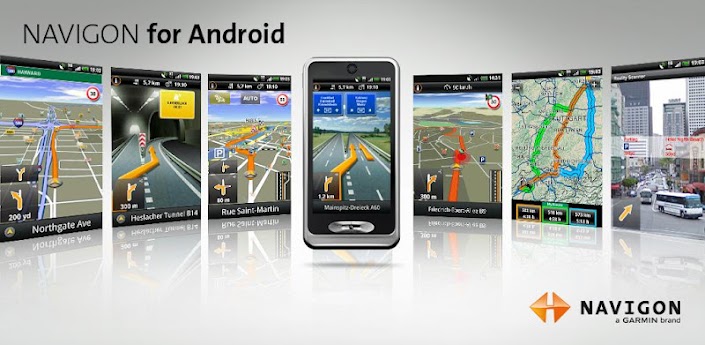
Overview :NAVIGON Europe - GPS navigation
NAVIGON GPS navigation for Europe

+++ New version 4.6.0 is now available +++
+++ Promotion on app and in-app “Urban Guidance” until 08-10-2012 +++

Important notes:
- New users: The software requires additional data (maps, voices etc.) via WLAN after installation!
With NAVIGON you can transform your Android smartphone into a fully functional mobile navigation system with on-board maps, which entails no data transfer or roaming charges for map display, route calculation, etc. Thanks to a faithful adaptation of the menu functions, the app fits in seamlessly with the Android operating concept.

*** Features and range of functions ***
+ Google Street View - destination preview (where available)
+ Lane assistant / Active Lane assistant (requires android 2.2 or higher)
+ Bluetooth support (requires android 2.2 or higher)
+ NAVION Latest Map Guarantee (new customers receive the most up-to-date map when purchasing the app)
+ Google Local Search
+ Safety Cameras (permanently installed cameras)
+ Reality View Pro
+ Speed Assistant
+ NAVIGON Reality Scanner
+ NAVIGON MyRoutes
+ Text-to-Speech and precise spoken announcements
+ Different English accents
+ Extended Pedestrian Navigation
+ Destination entry with coordinates
+ 2D and 3D map displays
+ Last Mile - can save automatically your car's position and switches to pedestrian- resp.public transport mode* for walking of the last mile.

*Public transport mode is available only when in-app “Urban guidance” has been purchased
+ NAVTEQ map material for 44 countries of Europe

NEW: Enhance your system with in-app packages
+ Urban Guidance – navigate in many European urban areas using public transport**
+ Panorama View 3D
+ NAVIGON FreshMaps XL
+ NAVIGON cockpit
+ TrafficLive
+ The Michelin restaurant and hotel guide
+ The Michelin green guide
+ ADAC camping guide (German language only)
+ POI all-in-one (extra POI package)
+ Mobile Alert Live - a new MOBILE danger zone service
+ NAVIGON LPG and Bio-Diesel filling stations

**The service is currently available in more than 55 European metropolitan areas. Urban Guidance is a Live service and therefore requires a data connection.

Note:
- Positioning your smartphone correctly in the vehicle is very important to ensure optimal GPS reception and for your own safety! Ensure that this is always positioned outside of the range of the airbags!
- NAVIGON is an on-board solution. This means that all map material, voice announcements and system files are saved on the telephone. Therefore no charges or waiting time for data transfer are incurred.
- The Europe version requires approx. 2GB of free memory. Please ensure you have sufficient available mass-storage space (SD card). The map material must be downloaded after installing the app via wireless Internet on the smartphone. Please ensure a reliable and safe connection is available.
- On first startup a short data connection (ca. 25kB) is required to register your product

Whether in the car, by bike or on foot, NAVIGON hopes you have fun navigating.

This app has NO advertisements


Requirements : 2.2

Download:
http://www.filedownloads.org/7heeph9invq4/NAVIGON.EU.v4.6.apk.html
http://ul.to/o08hmc3f


Please Post Your Suggestions.


Read More!
TomTom Europe v1.0 Android


TomTom Europe v1.0 Android

Overview :TomTom Navigation for Android. World-class navigation that’s trusted by 65 million drivers. Now on your smartphone.

Last minute plans? With the TomTom Navigation app, driving somewhere new couldn’t be easier. You’ve always got your smartphone with you, so navigation’s close at hand. And losing signal is not a problem, because the app works without it. You’ll have constant access to the same maps, technology and world-class navigation as on our satnavs. It’s the app that drivers can rely on.

*** Great reasons to choose TomTom Navigation ***
Only the TomTom Navigation app offers all this:
- The most accurate TomTom maps in your pocket – no mobile signal needed
- FREE Lifetime Maps. Always drive with the latest map and get to your destination faster. Download 4 or more full updates every year for the life of your app.
- Reliable arrival times at all times of day with IQ Routes
- The quickest routes through traffic, proven. Powered by TomTom HD Traffic (1)
- Fewer speeding fines with real-time camera alerts via TomTom Speed Cameras (1)
- Advanced lane guidance for extra clarity when navigating difficult junctions
- Spoken street names, helping you keep your eyes on the road. (2)

*** FEATURES ***
- 2D/3D driving view
- Clear voice instructions
- Fast route recalculation
- Multi-stop routes
- Eco Routes
- Navigate to contacts
- Search TomTom Places and POIs
- Automatic music fading
- Automatic day & night mode
- Car symbols
- Map colours

*** MAPS COVERAGE ***
- A full and up-to-date map is stored on your phone
- Fast and reliable mapping that does not require a cellular signal or data plan usage
- No data roaming costs are incurred when traveling abroad
- AD, AT, BE, CH, CZ, DE, DK, EE, ES, FI, FR, GB, GR, HU, IC, IE, IT, LI, LT, LU, MC, MT, NL, NO, PL, PT, SE, SI, SK, SM, VA, RU (42%), LV (63%), BG (53%), HR (60%).

*** BEFORE YOU BUY THIS APP ***
1. Check that you have at least 3.4Gb of free storage space, either on your internal phone memory or external storage. To look it up, go to your phone settings, and then data storage.
2. If there’s enough storage, buy the app using your Google account and install it on your phone. You now need to download the latest TomTom map before you can use the app.
3. Connect your phone via Wifi to the internet and open up the app. You will then be able to download your new map. This download may take up to two hours depending on your internet connection. Connect your phone to a charger and stay in range of your WiFi network until the download is complete.

*** MORE INFORMATION ***
(1) Check http://android.tomtom.com for availability of TomTom HD Traffic or Speed Cameras per country.
(2) Spoken street names comes in the following languages: Spanish, Slovak, Russian, Portuguese, Polish, Norwegian, Italian, Indian English, Hungarian, Greek, German, French, Flemish, Finnish, Dutch, Danish, Czech, British English, Turkish, Swedish

This app has NO advertisements

Requirements : 2.2+

Download:
http://uploaded.net/file/7f7s08hc

Mirrors:
http://www.share-online.biz/dl/Q5P24EBM0A
http://www40.zippyshare.com/v/45837957/file.html


Please Post Your Suggestions.


Read More!
TomTom Western Europe v1.0 Android


TomTom Western Europe v1.0 Android

Overview :TomTom Navigation for Android. World-class navigation that’s trusted by 65 million drivers. Now on your smartphone.

Last minute plans? With the TomTom Navigation app, driving somewhere new couldn’t be easier. You’ve always got your smartphone with you, so navigation’s close at hand. And losing signal is not a problem, because the app works without it. You’ll have constant access to the same maps, technology and world-class navigation as on our satnavs. It’s the app that drivers can rely on.

*** Great reasons to choose TomTom Navigation ***
Only the TomTom Navigation app offers all this:
- The most accurate TomTom maps in your pocket – no mobile signal needed
- FREE Lifetime Maps. Always drive with the latest map and get to your destination faster. Download 4 or more full updates every year for the life of your app.
- Reliable arrival times at all times of day with IQ Routes
- The quickest routes through traffic, proven. Powered by TomTom HD Traffic (1)
- Fewer speeding fines with real-time camera alerts via TomTom Speed Cameras (1)
- Advanced lane guidance for extra clarity when navigating difficult junctions
- Spoken street names, helping you keep your eyes on the road. (2)

*** FEATURES ***
- 2D/3D driving view
- Clear voice instructions
- Fast route recalculation
- Multi-stop routes
- Eco Routes
- Navigate to contacts
- Search TomTom Places and POIs
- Automatic music fading
- Automatic day & night mode
- Car symbols
- Map colours

*** MAPS COVERAGE ***
- A full and up-to-date map is stored on your phone
- Fast and reliable mapping that does not require a cellular signal or data plan usage
- No data roaming costs are incurred when traveling abroad
- AD, AT, BE, CH, CZ, DE, DK, EE, ES, FI, FR, GB, GR, HU, IC, IE, IT, LI, LT, LU, MC, MT, NL, NO, PL, PT, SE, SI, SK, SM, VA, RU (42%), LV (63%), BG (53%), HR (60%).

*** BEFORE YOU BUY THIS APP ***
1. Check that you have at least 3.4Gb of free storage space, either on your internal phone memory or external storage. To look it up, go to your phone settings, and then data storage.
2. If there’s enough storage, buy the app using your Google account and install it on your phone. You now need to download the latest TomTom map before you can use the app.
3. Connect your phone via Wifi to the internet and open up the app. You will then be able to download your new map. This download may take up to two hours depending on your internet connection. Connect your phone to a charger and stay in range of your WiFi network until the download is complete.

*** MORE INFORMATION ***
(1) Check http://android.tomtom.com for availability of TomTom HD Traffic or Speed Cameras per country.
(2) Spoken street names comes in the following languages: Spanish, Slovak, Russian, Portuguese, Polish, Norwegian, Italian, Indian English, Hungarian, Greek, German, French, Flemish, Finnish, Dutch, Danish, Czech, British English, Turkish, Swedish

This app has NO advertisements


Requirements : 2.2+

Download:
http://uploaded.net/file/vxsd1ikz

Mirrors:
http://www.share-online.biz/dl/OFCBAFBMFXC
http://www44.zippyshare.com/v/21679891/file.html
 

Please Post Your Suggestions.


Read More!
NavDroyd v1.4.0


NavDroyd v1.4.0

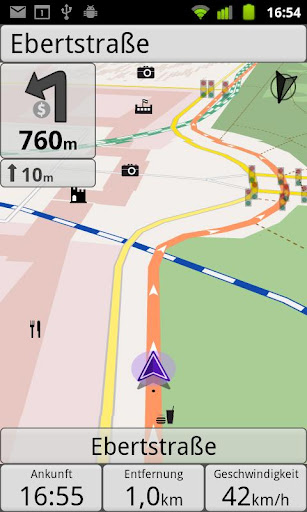
Overview :Onboard/Offline GPS Navigation App.

» worldwide 2D/3D OSM maps
» turn-by-turn routing/navigation
» voice/audio guidance (>1.6)
» car/pedestrian routing (bike to come)
» local search (places/POI)
» visual/audio speed warning
» map themes (day/night/outdoor)
» frequent map updates
» no cellular network required
» no hidden roaming costs

What's in this version:
- Supports bicycle routing
- Supports multiple text-to-speech engines
- Map renders labels in right-to-left countries properly (e.g. Hebrew, Arabic)
- Supports Japanese (user interface plus guidance)
- Feedback form for "bad" routing results


Requirements : Android 1.5+

Download:
http://depositfiles.com/files/pfoj1dv8r

Please Post Your Suggestions.


Read More!
OziExplorer v1.17


OziExplorer v1.17

Overview :OziExplorer for Android is moving map software for devices running the ANDROID O/S. It uses raster map images which are either scanned or purchased in digital format. It allows you to track your position received from the GPS on a map (moving map).

OziExplorer for Android is not automatic route planning software, you cannot request the best way to get from point A to point B, the types of maps OziExplorer for Android uses do not allow this.

OziExplorer runs on Android devices but it relies on map calibrations etc to be provided by the full PC version of OziExplorer, you also need the full OziExplorer to calibrate maps, plan trips by adding waypoints etc.

The unlicensed OziExplorer for Android will work with the unlicensed OziExplorer but the limitations of both packages will apply.

Main Features
Moving map navigation using the internal GPS.
Course Up Mode.
3D Perspective View Mode.
Uses almost any map which can be created by the PC version of OziExplorer.
Use our Img2ozf utility to convert maps to OZFX3 format.
OZF2, OZFX3, ECW, JP2 (jpeg 2000) directly supported.
PNG, JPG directly supported (small maps less than 20MBytes uncompressed).
Automatic loading of the next map.
Check for more detailed map at a set interval.
User tracks can be loaded
Logging of Track points to file.
Create Waypoints at current position by pressing the Create Wp screen button.
Navigation to a waypoint or along a route.
Using the Route Create option, routes can be created on the device.
Many Map Zoom levels.
Various Position display formats.
On screen display of Speed, Bearing and Altitude.
Display Waypoints on the map.
Name Search
Satellite View showing SNR, number of Sats and HDOP.
Design your own screens using the free Screen Designer on your PC.
+ many more features to be added in future versions.

Recent changes:
Version 1.17
- Fixed major problem of OziExplorer not being able to see the external sdcard when there is both an internal and external sdcard.
- OziExplorer should now only show the sdcard folders when using the OziExplorer folder selector (not all the folders on the device).
- Fixed VMG, calculation was not correct.
- Fixed ETE/ETA display for many parameters including average speed calculations.
- Fixed the min altitude display (was displaying the max altitude).
- Fix grid coordinate display, coordinates were correct for UTM but not other grids, now fixed
- Added French language.
- other minor fixes.

Version 1.16
- Added many different languages. If you would like to do a translation see the Translation page link on the OziExplorer for Android web page.
- Some Android devices report the speed incorrectly - out by a factor of about 2 - the GPS std nmea sentences report the speed in knots, android reports it in meters/sec, the conversion between the two is about a factor of 2, could it be that the programmers who wrote the gps drivers for these devices did not notice that android requires meters/sec. OziExplorer will now read a speed factor from a file called speed_factor.dat, it is a simple text file, the first line in the file is the speed factor - example 0.5 . The GPS speed is multiplied by the speed factor. You need to create the speed_factor.dat file yourself and place it in the OziExplorer folder on the sdcard.
- Fixed compass not working correctly when bearing unit set to magnetic.


Requirements : Android v2.1+

Download:
http://rapidgator.net/file/30970536

Mirror:
http://turbobit.net/6oz1mvyzap18.html
http://depositfiles.com/files/3cp3jl3gh
Please Post Your Suggestions.


Read More!
Google Maps v6.10.0 Mod + World Navigation Activated


Google Maps v6.10.0 Mod + World Navigation Activated

Overview :Get Google Maps with Navigation (Beta), Places, and Latitude
Overview: Download the latest release of Google Maps, and never carry a paper map again.

Google Maps for Android with Navigation (Beta) has:

* Detailed maps with 3D buildings
* Voice guided turn-by-turn GPS navigation
* Driving, public transit, biking, and walking directions
* Live traffic information to avoid congestion
* Local search and business reviews
* Google Maps Street View
* Indoor maps for select airports, hotels, retail stores, and more

Whether you need directions to your destination, the closest good place for a bite to eat, or just a sense of where you are, Google Maps for Android can help.

Keywords: maps, navigation, places, latitude, directions, indoor maps, local search, Street View, traffic, transit

What's in this version:
* Save maps for use offline

Google Maps v6.10.0 Mod - With World Navigation activated
This map is for the country that cant use navigation on google map. It has been hacked and can be used by any country now.

What's features in Google Maps v6.10.0 Mod version:
(1) This version of the navigation icons can be used directly, different previous versions can only be to call the navigation through the map;
This version is the accelerated version. Some phones gprs under .. can not download the map cache (Heavenly shield the Google server reasons);
(3) This version supports Samsung TTS voice navigation (Samsung Mobile), for the first time support Iflytek voice, the addition of a choice to select the voice navigation for oil;
(4) This version is not like the low-capacity version by other Modifiers, may lead to some low-end phones can not be installed;

Installation for root:

1. In Titanium Backup, select Maps and make a backup.
2. Select Maps and wipe data, then uninstall.
3. Select Street View and wipe data, then uninstall.
4. Install maps6.10.0-mod_signed.apk
5. Go to market, and reinstall street view.(download it from the second post).
Or
1.Uninstall maps from Titanium Backup.
2.Install maps from the Market.
3.Uninstall it normally (not from Titanium).
4.Install the maps6.10.0-mod_signed.apk.

Or ADB

first uninstall Maps from /system/app
rename maps6.10.0-mod.apk to Maps.apk

adb remount
adb push /Maps.apk /system/app


Alternative installation method:

Note:
For those who get the "Login Failed" message Pull down the status bar and press all three triangles and give permission then closing maps.

If you don't get the three warning triangles
1. Install original maps from market.
2. Sign in and join latititude
3. Back up maps in titanium, app and data.
4. Wipe date and uninstall maps
5. Install maps6.10.0-mod_signed.apk. DO NOT RUN, reboot right after installing.
6. After reboot, go to titanium and restore DATA only.

yea and unchecking auto-update on the marked.

Thanks to ownhere and Brut.all.

maps6.10.0-mod-signed.apk rename the file name to "Maps" and then use ROOT explorer app put in system/app permission is rw-r-r.
maps6.10.0-mod.apk instructions can be found in the text above.


Requirements : for all Android versions

Download:
maps6.10.0-mod.apk
http://rapidgator.net/file/33205441/maps6.10.0-mod.apk.html

Mirror:
http://ul.to/c3b7l11b

maps6.10.0-mod_signed.apk
http://rapidgator.net/file/33207650/maps6.10.0-mod_signed.apk.html

Mirror:
http://ul.to/1xkoqa4s


Please Post Your Suggestions.


Read More!
Locus Pro v2.5.6


Locus Pro v2.5.6

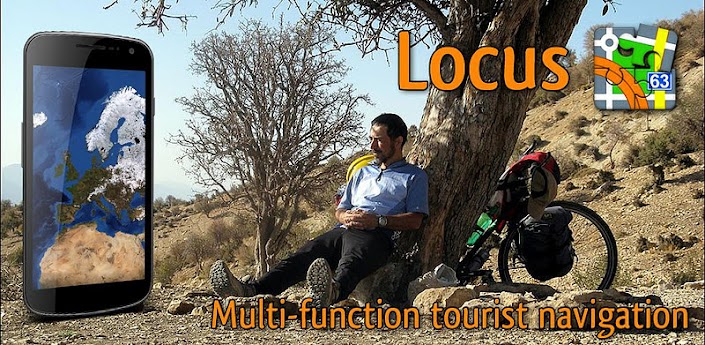
Overview :MULTI-FUNCTION TOURIST NAVIGATION

Irreplaceable application for hiking, geocaching and your everyday life.

Locus offers many useful features such as:
- Online maps mapy (Openstreetmap - OSM, Freemap, SHOCart, MapQuest, Navigasi, Turaterkep, NzTopoMaps, Osmapa.pl)
- Offline maps (Support for formats SQLite, TAR maps, MBT maps, GEMF, Rmap)
- Navigation (online calculation tracks)
- Vector maps
- WMS service
- Track record
- Integration of Google My Maps (reading and editing)
- Geocaching
- Parking
- Weather service
- Point of interest
- POI alert
- Search (by adress, coordinates, contact)
- Custom screen (created by community)
- Integration of GPSies, Breadcrumbs, Street View and other
- API for developers
- Work with KML, GPX, OpenAir, DXF formats
- Add-ons (GeoGet database, GSAK database, Vector maps, Augmented reality, Foursquare, etc.)

What's in this version:
WARNING! In some cases of Android 4.1, if application crash at start, please, clear cache of the Locus or re-install it.
*** 2.5.6 ***
Bugfix version
*** 2.5.5 ***
add: small survey
add: ability to define number of buttons in top panel
add: ability to remove unused "GC Offlinized" images
add: ability to lock screen orientation for whole application
fix: rare problems with import (also from add-ons)
fix: fixed problem with remembering of disabled Map items
fix: and many more

Instructions:
1. Install Locus Pro and don't run.
2. Install Lucky Patcher (Run and Custom patch!)
3. Enjoy

Thanks to ChelpuS


Requirements : Android 2.1+

Download:
http://rapidgator.net/file/30289269/l256.zip.html

Mirror:
http://turbobit.net/2n3ss5vqyfd1.html
http://www.MegaShare.com/4447370


Please Post Your Suggestions.


Read More!
Geocaching v2.3.1


Geocaching v2.3.1

Overview : Go geocaching with your Android phone: Groundspeak’s Official Geocaching App.

Go geocaching with your Android phone: Groundspeak’s Official Geocaching App

-Direct access to Geocaching.com's database of geocaches
-Search by current location, address or GC code
-View geocache details
-Navigate to geocaches with a simulated compass arrow or directly from the map
-Log geocache finds and post notes in the field
See http://www.geocaching.com/Android for a full list of features


Requirements : Android 1.5+

Download:
http://www.MegaShare.com/4192195

Mirror:
http://www.filehost.ws/n71oggqi5jhw


Please Post Your Suggestions.


Read More!

SkyDroid - Golf GPS v1.7


SkyDroid - Golf GPS v1.7

Overview :SkyDroid turns your phone into a Golf GPS rangefinder.

Features
- GPS Distance to every green
- Distances to water hazards, bunkers, etc
- Satellite view of every course!
- Distance to ANY point on the map!
- Shot Tracking!
- Download unlimited courses
- Map ANY course online!

Visit www.skydroid.net to see our course list

Recent changes:
layouts for smaller screens
layout for Tablet added
fix for phone icon bug
fix for long course names issue


Requirements : Android

Download:
http://www.filesonic.com/file/52958035

Mirror:
http://www.duckload.com/download/1969036/sd17.zip


Please Post Your Suggestions.


Read More!
Sygic Aura Navigator v11.2.6 apk + Base Files + Maps Android


Sygic Aura Navigator v11.2.6 apk + Base Files + Maps Android

Overview : Maps, .apk and Base Files for the premium turn-by-turn GPS navigation app.

What's in this version:
(In v11.2.6):
?Search of house numbers in Germany and Czech Republic fixed
?Latest maps with updated road coverage for Pakistan
?Introducing Real-Time Traffic information for Singapore! Know what lies ahead with the first and only navigation app that features fully integrated traffic for Singapore. Available at http://www.sygic.com
(In previous versions):
?Updated maps of India. If you have already updated to version 11.2.4 and you do not use maps of India it's not necessary to install this update.
FREE map update including:
?Latest road coverage
?Updated house numbers
?Updated POI database
?Updated lanes
?Updated speed limits
?Compatibility with Android 4.0

Base Files with Multi-language Voices & TTS includes:

Voices:
[*]Arabic Man
[*]Arabic Woman
[*]Azerbaijani Woman
[*]Bulgarian Man
[*]Cantonese Woman
[*]Catalan Woman
[*]Chinese tw Woman
[*]Chinese Woman
[*]Czech Man
[*]Danish Woman
[*]Dutch Woman
[*]English Au Woman
[*]English Man
[*]English US Woman
[*]English Woman
[*]Estonian Man
[*]Farsi Man
[*]Farsi Woman
[*]Finnish Woman
[*]French Man
[*]German Woman
[*]Greek Woman
[*]Hebrew Man
[*]Hungarian Woman
[*]Indonesian Woman
[*]Italian Woman
[*]Kazakh Woman
[*]Malay Woman
[*]Norwegian Woman
[*]Polish Woman
[*]Portuguese Br Woman
[*]Portuguese Woman
[*]Romanian Woman
[*]Russian Woman
[*]Slovak Woman
[*]Slovene Woman
[*]Spanish Latin Man
[*]Spanish Latin Woman
[*]Spanish Woman
[*]Swedish Man
[*]Thai Woman
[*]Turkish Woman
[*]Ukrainian Woman
[*]Vietnamese Woman

TTS(Text-to-speech):
[*]TTS American English
[*]TTS Australian English
[*]TTS British English
[*]TTS Canadian French
[*]TTS Danish
[*]TTS Dutch
[*]TTS French
[*]TTS German
[*]TTS Italian
[*]TTS Portugues de Brasil
[*]TTS Portuguese
[*]TTS Russian
[*]TTS Slovak
[*]TTS Spanish
[*]TTS Swedish


Base Files with English Voices & TTS includes:
Voices:
[*]English Au Woman
[*]EnglishMan
[*]English US Woman
[*]English Woman

TTS(Text-to-speech):
[*]TTS American English
[*]TTS Australian English
[*]TTS British English


Installation Instructions:

    Download and install the .apk
    Download the Base Files(need not download if you're upgrading from v11.2.5) and desired Maps
    Extract/unrar and copy the file 'Aura' (the base files) into the path /sdcard/
    Extract/unrar the Maps (the resulting folder should read something like 'xxx.yy.2013.01')
    Copy that into the path /sdcard/aura/maps/
    If you would like to place the files in your external memory, follow these paths: /sdcard/external_sd/ and /sdcard/external_sd/aura/maps/
    Only for the FIRST time: Launch 'Sygic Downloader' that gets installed along with the app. You might have to download a small amount of data (~30 MB) for the first time. It verifies and should show 100% against the maps you have installed.
    Close downloader and launch the app.
    Please do not attempt to 'Activate' the product. Your app will go back to trial version if you do so.
    OPTIONAL: You may use an email and password to log-in to Sygic when it prompts. You will get access to additional features like weather, etc. without affecting the app.
    Happy navigating! :-)


Troubleshooting Tips:
If the app freezes at 'initializing' or 'connecting', and then crashes every time you start:
Disable GPS in the device setings
Launch the app
It will take you to the device settings to enable GPS. Enable it now
Back to the app, and voila! It works now!

If you find Greek interface, and if you don't know the language, here's the instructions:
Select the Options Button.
Select the 6th option(PuOmioec - this is the closest in english to the greek word).
Select the 5th option(Tottikoc - this is the closest in english to the greek word).
Select the first (Eyynvika) Item, then select the version of English you need.
Press '<-Back' all the way back to the main program.


Requirements : Android v2.0.1 and above

Download:


 SygicNavigator 11.2.6.apk 5.94 MB
 Base Files with English Voices & TTS 239.45 MB
 Base Files with Multi-language Voices & TTS 345.2 MB

Africa: 33 Maps

 Algeria 33.16 MB
 Angola 28.95 MB
 Benin 2.7 MB
 Botswana 7.63 MB
 Burkina Faso 4.83 MB
 Cameroon 9.76 MB
 Democratic Republic of the Congo 30.72 MB
 Egypt 33.52 MB
 Gabon 5.64 MB
 Ghana 7.71 MB
 Kenya 9.84 MB
 Lesotho 2.86 MB
 Malawi 6.6 MB
 Mali 14.38 MB
 Marocco 41.24 MB
 Mauritania 10.8 MB
 Mauritius 1.17 MB
 Mayotte 156.53 KB
 Mozambique 18.21 MB
 Namibia 15.14 MB
 Niger 13.85 MB
 Nigeria 27.66 MB
 Republic of the Congo 6.41 MB
 Reunion 2.62 MB
 Senegal 3.86 MB
 South Africa 92.9 MB
 Swaziland 2.05 MB
 Tanzania 13.93 MB
 Togo 1.55 MB
 Tunisia 7.48 MB
 Uganda 6.46 MB
 Zambia 14.05 MB
 Zimbabwe 10.58 MB

Asia: 16 Maps

 Azerbaijan 10.21 MB
 Brunei Darussalam 759.67 KB
 Hong Kong 11.23 MB
NEW India 378.13 MB
 Indonesia 87.7 MB
 Iran 44.2 MB
 Iraq 10.59 MB
NEW Kazakhstan 81.95 MB
 Macao 2.29 MB
 Malaysia 34.02 MB
NEW Pakistan 66.14 MB
 Philippines 11.94 MB
 Singapore 17.62 MB
 Taiwan 78.54 MB
 Thailand 114.26 MB
NEW Vietnam 71.7 MB

Australia and New Zealand: 2 Maps

 Australia 260.33 MB
 New Zealand 41.47 MB

Europe: 45 Maps

 Albania 877.84 KB
 Andorra 274.07 KB
 Austria 60.56 MB
 Belarus 3.83 MB
 Belgium 59.5 MB
 Bosnia and Herzegovina 1.46 MB
 Bulgaria 16.49 MB
 Croatia 15.68 MB
 Czech Republic 43.65 MB
 Denmark 40.2 MB
 Estonia 12.46 MB
 Finland 82.95 MB
 France 465.42 MB
 Germany 483.27 MB
 Gibraltar 35.54 KB
 Greece 56.47 MB
 Hungary 29.11 MB
 Ireland 26.36 MB
 Italy 329.58 MB
 Latvia 7.57 MB
 Liechtenstein 188.98 KB
 Lithuania 12.46 MB
 Luxembourg 5.12 MB
 Malta 2.72 MB
 Monaco 75.1 KB
 Montenegro 518.04 KB
 Netherlands 78.72 MB
 Norway 77.93 MB
 Poland 79.8 MB
 Portugal 69.55 MB
 Republic of Moldova 1023.3 KB
 Romania 14.39 MB
 Russian Federation 499.13 MB
 San Marino 173.54 KB
 Serbia 2.04 MB
 Slovakia 17.73 MB
 Slovenia 24.22 MB
 Spain 285.27 MB
 Sweden 112.32 MB
 Switzerland 43.54 MB
 The Former Yugoslav Republic of Macedonia 761.93 KB
 Turkey 94.46 MB
 Ukraine 28.51 MB
 United Kingdom 273.39 MB
 Vatican 15.17 KB

Middle East: 7 Maps

 Bahrain 0.96 MB
 Israel 21.19 MB
 Kuwait 2.48 MB
 Oman 4.89 MB
 Qatar 1.68 MB
 Saudi Arabia 41.8 MB
 United Arab Emirates 6.06 MB

North America: 55 Maps

 Alabama 41.74 MB
 Alaska 53.15 MB
 Arizona 68.39 MB
 Arkansas 32.98 MB
 California 274.26 MB
 Canada 392.86 MB
 Colorado 54.38 MB
 Connecticut 21.35 MB
 D.C. 11.18 MB
 Delaware 7.62 MB
 Florida 154.53 MB
 Georgia 75.25 MB
 Hawaii 11.26 MB
 Idaho 21.98 MB
 Illinois 90.61 MB
 Indiana 52.48 MB
 Iowa 27.73 MB
 Kansas 30.6 MB
 Kentucky 37.27 MB
 Louisiana 43.59 MB
 Maine 14.76 MB
 Maryland 39.09 MB
 Massachusetts 48.78 MB
 Mexico 179.88 MB
 Michigan 81.06 MB
 Minnesota 55.77 MB
 Mississippi 30.12 MB
 Missouri 60.05 MB
 Montana 28.52 MB
 Nebraska 24.24 MB
 Nevada 38.7 MB
 New Hampshire 10.63 MB
 New Jersey 54.32 MB
 New Mexico 31.47 MB
 New York 119.68 MB
 North Carolina 81.77 MB
 North Dakota 16.56 MB
 Ohio 86.11 MB
 Oklahoma 35.87 MB
 Oregon 45.49 MB
 Pennsylvania 101.21 MB
 Peurto Rico 8.46 MB
 Rhode Island 8.94 MB
 South Carolina 41.94 MB
 South Dakota 16.03 MB
 Tennessee 80.41 MB
 Texas 219.14 MB
 Utah 26.9 MB
 Vermont 9.04 MB
 Virgin Islands 612.03 KB
 Virginia 61.9 MB
 Washington 59.66 MB
 West Virginia 15.45 MB
 Wisconsin 56.84 MB
 Wyoming 18.45 MB

South America: 6 Maps

 Argentina 58.99 MB
 Brazil 283.79 MB
 Chille 37.26 MB
 Colombia 100.3 MB
 Uruguay 4.12 MB
 Venezuela 19.57 MB

Mirrors:
SygicNavigator 11.2.6.apk 5.94 MB
Base Files with ONLY English Voices & TTS 239.5 MB
Base Files with Multi-language Voices & TTS 345.20 MB

Africa: 33 Maps

Algeria 33.16 MB
Angola 28.95 MB
Benin 2.7 MB
Botswana 7.63 MB
Burkina Faso 4.83 MB
Cameroon 9.76 MB
Democratic Republic of the Congo 30.72 MB
Egypt 33.52 MB
Gabon 5.64 MB
Ghana 7.71 MB
Kenya 9.84 MB
Lesotho 2.86 MB
Malawi 6.6 MB
Mali 14.38 MB
Marocco 41.24 MB
Mauritania 10.8 MB
Mauritius 1.17 MB
Mayotte 156.53 KB
Mozambique 18.21 MB
Namibia 15.14 MB
Niger 13.85 MB
Nigeria 27.66 MB
Republic of the Congo 6.41 MB
Reunion 2.62 MB
Senegal 3.86 MB
South Africa 92.9 MB
Swaziland 2.05 MB
Tanzania 13.93 MB
Togo 1.55 MB
Tunisia 7.48 MB
Uganda 6.46 MB
Zambia 14.05 MB
Zimbabwe 10.58 MB

Asia: 16 Maps

Azerbaijan 10.21 MB
Brunei Darussalam 759.67 KB
Hong Kong 11.23 MB
NEWIndia 378.13 MB
Indonesia 87.7 MB
Iran 44.2 MB
Iraq 10.59 MB
NEWKazakhstan 81.95 MB
Macao 2.29 MB
Malaysia 34.02 MB
NEWPakistan 66.14 MB
Philippines 11.94 MB
Singapore 17.62 MB
Taiwan 78.54 MB
Thailand 114.26 MB
NEWVietnam 71.7 MB

Australia: 2 Maps

Australia 260.3 MB
New Zealand 41.5 MB

Europe: 45 Maps

Albania 877.8 KB
Andorra 274.07 KB
Austria 60.56 MB
Belarus 3.83 MB
Belgium 59.5 MB
Bosnia and Herzegovina 1.5 MB
Bulgaria 16.49 MB
Croatia 15.7 MB
Czech Republic 43.7 MB
Denmark 40.2 MB
Estonia 12.5 MB
Finland 82.9 MB
France 465.4 MB
Germany 483.3 MB
Gibraltar 35.54 KB
Greece 56.47 MB
Hungary 29.11 MB
Ireland 26.36 MB
Italy 329.58 MB
Latvia 7.57 MB
Liechtenstein 188.98 KB
Lithuania 12.46 MB
Luxembourg 5.12 MB
Malta 2.72 MB
Monaco 75.1 KB
Montenegro 518.04 KB
Netherlands 78.72 MB
Norway 77.93 MB
Poland 79.8 MB
Portugal 69.55 MB
Republic of Moldova 1023.3 KB
Romania 14.39 MB
Russian Federation 499.13 MB
San Marino 173.54 KB
Serbia 2.04 MB
Slovakia 17.73 MB
Slovenia 24.22 MB
Spain 285.27 MB
Sweden 112.32 MB
Switzerland 43.54 MB
The Former Yugoslav Republic of Macedonia 761.93 KB
Turkey 94.46 MB
Ukraine 28.51 MB
United Kingdom 273.39 MB
Vatican 15.17 KB

Middle East: 7 Maps

Bahrain 0.96 MB
Israel 21.19 MB
Kuwait 2.48 MB
Oman 4.89 MB
Qatar 1.68 MB
Saudi Arabia 41.8 MB
United Arab Emirates 6.06 MB

North America: 55 Maps

Alabama 41.74 MB
Alaska 53.15 MB
Arizona 68.39 MB
Arkansas 32.98 MB
California 274.26 MB
Canada 392.86 MB
Colorado 54.38 MB
Connecticut 21.35 MB
D.C. 11.18 MB
Delaware 7.62 MB
Florida 154.53 MB
Georgia 75.25 MB
Hawaii 11.26 MB
Idaho 21.98 MB
Illinois 90.61 MB
Indiana 52.48 MB
Iowa 27.73 MB
Kansas 30.6 MB
Kentucky 37.27 MB
Louisiana 43.59 MB
Maine 14.76 MB
Maryland 39.09 MB
Massachusetts 48.78 MB
Mexico 179.88 MB
Michigan 81.06 MB
Minnesota 55.77 MB
Mississippi 30.12 MB
Missouri 60.05 MB
Montana 28.52 MB
Nebraska 24.24 MB
Nevada 38.7 MB
New Hampshire 10.63 MB
New Jersey 54.32 MB
New Mexico 31.47 MB
New York 119.68 MB
North Carolina 81.77 MB
North Dakota 16.56 MB
Ohio 86.11 MB
Oklahoma 35.87 MB
Oregon 45.49 MB
Pennsylvania 101.21 MB
Peurto Rico 8.46 MB
Rhode Island 8.94 MB
South Carolina 41.94 MB
South Dakota 16.03 MB
Tennessee 80.41 MB
Texas 219.14 MB
Utah 26.9 MB
Vermont 9.04 MB
Virgin Islands 612.03 KB
Virginia 61.9 MB
Washington 59.66 MB
West Virginia 15.45 MB
Wisconsin 56.84 MB
Wyoming 18.45 MB

South America: 6 Maps

Argentina 58.99 MB
Brazil 283.79 MB
Chille 37.26 MB
Colombia 100.3 MB
Uruguay 4.12 MB
Venezuela 19.57 MB
Please Post Your Suggestions.


Read More!