Home » PPC Applications
AMH Handheld Jan 2012 Edition


AMH Handheld Jan 2012 Edition

Overview : AMH Handheld is a downloadable version for Personal Digital Assistants (PDAs) and other Handheld/Mobile devices.

Features:
* Contains over 2,000 pages designed for ease of use on a small screen
* Allows you to browse by chapter or search by generic drug name, brand name, class name, interaction or treatment
* Has intuitive navigation
* Occupies only 4MB of space on your device
BackgroundAMHis the indispensable drug reference for Australian healthcare professionals, with a reputation for independence and accuracy second to none. It is continuously updated by an expert editorial team of pharmacists and medical practitioners. It has a distinguished Editorial Advisory Board and reviewers drawn from many of Australia’s leading educational and medical institutions.Each chapter contains common information that provides a framework for the reader to use the individual drug monographs. These monographs are organised within chapters, each of which represents an organ system and the major therapeutic drug classes within the system.Comparative information about different drugs within the same class, or other drugs for the same indication, is highlighted so that the reader can make an informed choice about the most appropriate drug to use.Since a publication of this size cannot be exhaustive, the writers and members of the Editorial Advisory Board have included only that material which they consider to be the most relevant and useful for rapid reference by the busy health professional.AMHcontains no drug company advertising. In fact, in line with our strict policy of total independence, we do not accept any commercial advertising or sponsorship, or direct editorial input, from any outside sources.Instead,AMHeditors critically review information and evidence from a wide range of resources, ensuring a comprehensive and current overview. For example,AMH first raised questions over cardiovascular safety with selective NSAIDS (COX-2 inhibitors) in our January 2002 edition - over two years before the Rofecoxib (Vioxx) ban and subsequent ongoing debate.2010 Edition:The 2010 edition contains new monographs on medicines marketed during 2009, including alfuzosin, cilostazol, dabigatran, desvenlafaxine, etoricoxib, methylnaltrexone, rivaroxaban, triptorelin, everolimus, etravirine, sugammadex, dutasteride and doripenem.Other important changes include updating the content that describes the uses for these new medicines to reflect changed evidence and practice. These include prevention of venous thromboembolism (dabigatran, rivaroxaban), benign prostatic hyperplasia (alfuzosin, dutasteride) and peripheral vascular disease (cilostazol).We also incorporate advice from new practice guidelines, hospital protocols, local and international literature, and regulatory sources. For example, in advance of changes to Australian product information, we have improved our dosage and drug interaction information for colchicine, to reduce its significant risk of toxicity. This was based on new FDA data providing evidence that doses much lower than those traditionally used are effective and safer.
Structure
* Chapters: Bring together treatment reviews and related drugs and drug classes. Nested documents keep common information together, enable comparisons and reduce repetition; cross references link relevant information. Practice points give tips and advice.
* Treatment: Summarises evidence and clinical practice for a condition and gives context for drug treatment. Discusses and compares the role of different classes and individual drugs in treating the condition.
* Drug Class: Cross refers to Treatment(s). Provides information common to all members, eg mode of action, contraindications, adverse effects. Comparative information describes differences between class members.
* Drug Monograph: If a drug is a class member it cross refers to Class for essential information common to the group. If not in a class it may refer to Treatment(s). Contains specific information for individual drugs, eg dosage, indications and products.
* Appendices: Include drug interactions, electrolytes, laboratory reference ranges and contact information
Philosophy:The philosophy of the AMH is to use the best available evidence to support prescribing and dispensing recommendations. The purpose of the AMH is twofold:
* To provide a readily accessible, concise, up-to-date source of independent drug information to facilitate effective, rational, safe and economical prescribing.
* To provide an educational tool for practitioners and students
Features and Benefits
* Clinically Relevant:AMH reflects Australian best practice. Using a best-available evidence approach,AMH editors appraise Australian and international sources, including Cochrane, Clinical Evidence, ACHRP CCHOTA assessments. Our content is reviewed by Australian experts and practicising health professionals from across the country (specialists, general practitioners, nurses, pharmacists).
* Quick and Easy to Use: Arranged according to organ system and therapeutic use. Edge-of-page tags provide instant access to sections. User-friendly index - look up disease, drug class, generic or brand name of medicine. Substantial cross referencing assists navigation.
* Safety and Efficacy: We include only clinically important drug interactions, with practical advice on management. Adverse effects are listed according to frequency. Monitoring advice for best outcome. Advice for patients, in everyday language. Special populations including children and older people.
* Save Time and Keep Up-To-Date: Accurate, concise and relevant drug and therapeutics information. Summaries of new evidence and areas of therapeutic uncertainty. Help in assessing the balance between efficacy and safety. Comparisons of treatments, drug classes and differences between members of a drug class.

Requirements :  WM2003-WM6.5

Download:
Reg with any key
http://uploading.com/files/mf3982ba/AMHHandheld.Jan.2012.crk_igorca.cab
Please Post Your Suggestions.


Read More!
2Easy Bwobble v1.0


2Easy Bwobble v1.0

Overview : Choose any image on your phone, draw with your finger or stylus where you want it to wobble and hey presto!

Those funny bits are wobbling up and down.

Find images
Draw wobble area
Adjust wobble speed
Several free uses in trial version

Requirements :  WM2003-WM6.5,NET.CF

Download:
http://uploading.com/files/5a35m1fm/2EasyBwobble.v.1.0.crk_igorca.cab
http://ul.to/6jztr07a/2EasyBwobble.v.1.0.crk_igorca.cab 
Please Post Your Suggestions.


Read More!
2Easy Morse Flasher v1.0


2Easy Morse Flasher v1.0

Overview : 2Easy Morse Flasher brightly flashes your messages in morse code.

Learn morse code.
Flash your friends.
Save messages that can be understood only by people who know morse code.
You can even send an SOS signal in an emergency!

Color selection
One click color randomization for crazy color combos
Adjustable flashing speed
Enter custom messages
One click message suggestion
Displays the letter currently being flashed, to help you learn morse code
Save messages to file (Windows Mobile can send these files to other people)
Optionally hide the letter being flashed when saving to file
Load messages from file.

Requirements :  WM2003-WM6.5

Download:
 http://ul.to/7xa4nl7s/2EasyMorseFlasher.v.1.0.crk_igorca.cab
http://uploading.com/files/c117c1cf/2EasyMorseFlasher.v.1.0.crk_igorca.cabPlease Post Your Suggestions.


Read More!
Flute Concert v1.3.1.0


Flute Concert v1.3.1.0

Overview : Flute Concert is a virtual flute application and it is for windows mobile devices!
- Compatible with Windows mobile 5.0 or higher
- Supports 3 octaves
- Octave controlled by tilting head of your smartphone.(using accelerometer)
- User friendly piano style key
- VIBRATE feedback when octave changes
- Blow your device's microphone to play flute
- Fast response and Realistic flute sound.
- Changeable volume.
- High quality user interface
- Auto-blow mode (for the lazy :-))
- 4-Type skin mode
- You can change octave by finger gesture in octave-circle (for none accelerometer devices)
- Support multi-track record and play!
- Support file save and load!
SUPPORT RESOLUTION
- WVGA, WQVGA, VGA, QVGA
(Does not support square type)

Requirements :  WM5-WM6.5,NET.CF

Download: Reg with key 1
 http://ul.to/ka7rg0lw/FluteConcert.v.1.3.1.0.crk_igorca.cab
http://uploading.com/files/375ba363/FluteConcert.v.1.3.1.0.crk_igorca.cab
Please Post Your Suggestions.


Read More!
BabyMode v1.1


BabyMode v1.1

Overview : BabyMode is a fun drawing application with built in child safety.

BabyMode is a fun drawing application with built in child safety. When in BabyMode, all device keys are disabled (except on/off key). If the phone rings (or notification fires) the sound will play, but screen will not change and keys will not work until you exit BabyMode (tap all four corners within three seconds). Then you can answer the call or handle notification.

Requirements :  WM2003-WM6.5

Download:
 http://ul.to/d92towdm/BabyMode.v.1.1.crk_igorca.cab
http://uploading.com/files/b4639e38/BabyMode.v.1.1.crk_igorca.cab
Please Post Your Suggestions.


Read More!
HandyDev Contacts Tools v1.03


HandyDev Contacts Tools v1.03

Overview : Ever tried to manage a number of contacts at once? Been in a situation when you need to delete 50 or 100 contacts, send a lot of contacts over Bluetooth or update all records for people working in the same company with new company's address or website, etc? If so, then Contacts Tools is for you!

Contacts Tools is a powerful tool to mass-manage your contacts. With Contacts Tools you can edit hundreds and thousands of contacts in a few stylus taps!
Organize your contacts easily! No more mechanical actions - just select the records you need and modify them instantly!

Features include:
Handy contacts selection screen. Select records individually, or use Find and Select feature.
Modify Field allows you to set a given field value for all selected records.
Delete all selected contacts with a single tap.
Perform a Find and Replace operation on selected contacts.
NEW! Beam all selected contacts easily.
Free updates for all registered users.

Requirements :  XScale.WM5.WM6

Download:
 http://ul.to/9vwtgmv9/ContactsToolsPPC.v.1.03.crk_igorca.cab
http://uploading.com/files/c5433744/ContactsToolsPPC.v.1.03.crk_igorca.cab
Please Post Your Suggestions.


Read More!
SMS at HAND v3.2.4002


SMS at HAND v.3.2.4002

Overview : SMS at Hand is the Windows Mobile text messaging application that arranges your short messages and calls into one to one, easy to follow, conversation

The messenger presents all ever used Contacts as a list of personal chats with the most intensively used contacts at the top of the list. The conversation screen provides all details of each item and shows the whole SMS text body without the necessity of unrolling it. There is a place to input an SMS, no matter how long it is going to be. SMS at Hand ensures that all operations made on the message items are reflected in the system message store and all operations made in other messengers are immediately reflected in the application.Then you are able to archive you conversation to HTML or text file. All smoothly scrolled by fingers.
Text messaging based on threaded SMS
Talks and messages are sorted chronologically for every Contact
Easy control by fingers
Smooth scrolling by finger flickering, on-screen big icons of most importent functions, etc.
Communication history summary
All SMS and voice communication history is instantly analyzed and presented to you to give you quick view.
Archiving to HTML or text file
emosh70Emoticons and user defined texts
Known chat symbols are represented as emoticons. User has possibility to define frequently used texts, signatures and emoticons. They will be easy accessed from menu.
Active links
The User may save to Contacts, navigate to web page, send an e-mail, call to number or send SMS depending of the link type.
Search
You can search your message database for required pattern.
Sorting and filtering
You can sort Contact from most intensively used, in alphabetical order, by date of the last message. You can filter them by selected letter or matched letters. You can filter your messages in many ways: only incoming, only sent, all messages, including call. Now all quickly by flickering an icons.
Auto sized editor
The new SMS editor gives you the possibility of controlling the typing of long messages by adjusting its size to text length and watching the conversation history at once.
The use of system message store
All operations made on the message items are reflected in the system message store and all operations made in other messengers are immediately reflected in SMS at Hand. You do not have to select the system to use any longer. Use one or both if you wish.
Quick switching between conversation
Advanced Options
Backgrounds, items and highlights adapt to the System Color Scheme and make your SMS at Hand interface fully compliant with the template you have selected. You can adjust the font size to your preferences. The application handles portrait and landscape orientation and automatically rescales for any resolution. On HTC phones with G-sensor program automatically handles autorotation.
Navigation to desired day
The calendar at hand enables you to find quickly messages from a specific date. It shows you months of conversation with clearly marked days on which you chatted with a given person. You can scroll through months and pick the appropriate day. After that, the conversation history repositions to that day.
The Today Screen notification
Cut, Copy and Paste options

Requirements :  WM2003-WM6.5,NET.CF

Download:
http://uploading.com/files/b81mm9ea/SMSatHand.v.3.2.4002.crk_igorca.cab
Please Post Your Suggestions.


Read More!
Thumb Voice Notes v1.0.1


Thumb Voice Notes v.1.0.1


Overview : Personal audio recorder application, allowing you to record audio notes for yourself in either WAV or OGG format.

This application is designed to provide a quick and easy alternative to making text based notes. Just start the application and record your notes/reminder in your own voice. It is designed for finger friendly use, all lists feature touch scrolling and easy to press finger friendly buttons throughout.

WAV files are supported but it is recommended to use the default - OGG Vorbis format. Ogg Vorbis is like mp3 providing great compression but without the licensing complications of the mp3 format.

Here are some key features of "Thumb Voice Notes":

· Finger/Thumb friendly with kinetic (touch) scrolling lists.
· Support for Ogg Vorbis (OGG) and WAV files.
· Graphics optimised for both QVGA and VGA based resolutions.
· Works on all windows mobile touch screen resolutions QVGA, VGA, WVGA, WQVGA, Square VGA and QVGA. Landscape or Portrait.

Requirements :  WM5-WM6.5,NET.CF

Download:
 Reg with any 6 digits
http://uploading.com/files/f29amdcf/ThumbVoiceNotes.v.1.0.1.crk_igorca.cab
Please Post Your Suggestions.


Read More!
VirtuaMouse v2.0


VirtuaMouse v.2.0

Overview : VirtuaMouse gives you a more precise way to tap the screen.

Make everything thumb-friendly
Improve tap accuracy. Avoid mis-taps. Enhance your one-handed precision.
VirtuaMouse aims to save you from the frustration of accidental mis-taps on your touchscreen, and from being forced to the stylus, when you really shouldn't have to. It's there when you need it, and can help you tap those places that your thumb can't accurately touch.
Cursor Jumping (New in v2.0)

Cursor Jumping is an innovative new feature in VirtuaMouse v2.0 that allows you to make the cursor "jump" around the screen as needed.

Double-tap in any direction to make the cursor "jump"
Makes moving around the screen much faster
Can be used to quickly move to the Start button, the Close button or the menubar
Tap and Drag Mode (New in v2.0)

Tap and Drag mode does the same thing that tapping and dragging your stylus or finger would do. You can use it to Copy & Paste text, highlight text/items on the screen, drag/move objects, and even do "finger scrolling" in supported applications.

Copy and Paste text
Tap and Drag windows that support Finger Scrolling
Activated easily, by double-tapping in the main area of the screen
Easy Select Mode (New in v2.0)

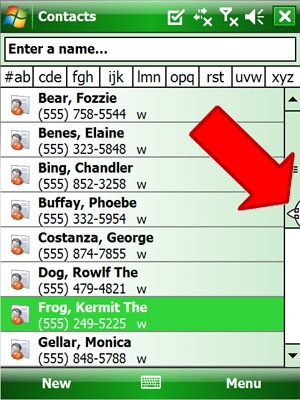
Easy Select mode helps you to quickly select something on the screen that may be easier to select with your arrow keys. It gives you back control of the D-Pad for a little while, allowing you to select an item. Then, once you've selected the item (for example, the email from your boss, your friend Monica phone number from your contact list, or a webpage link), just press the Action button to open that item, just as you would if you didn't have VirtuaMouse running.

Once the Action button is pressed, the selected item is opened, and VirtuaMouse is reactivated.

Easily select emails, contacts, programs or web links
Quickly activate by double-tapping on the main part of the scrollbar
Saves you time, by switching to arrow key mode until you select the item
Easily show and hide the cursor when you need it

VirtuaMouse has three ways to easily and quickly show/hide the mouse cursor:
By tapping on the Easy Show/Hide menubar button
By setting a hardware key (see the "Buttons" tab in VirtuaMouse Settings)
By selecting the "Toggle VirtuaMouse" icon in the Programs or Start menu
Customizable cursor speed
VirtuaMouse's cursor speed is fully customizable. You can go from super-fast to super-slow, whatever you prefer. See the "Speed" tab in VirtuaMouse Settings.
Smooth Acceleration for enhanced precision
Having the cursor gradually accelerate means gives you greater control over the cursor, allowing you to tap much more precisely. VirtuaMouse gives you three acceleration settings: slow, medium, and fast. Play around with each one and see which acceleration you'd prefer.
The slower the acceleration, the easier it will be for you to tap really small items on the screen. Of course, this means it will take longer for the cursor to reach top speed when you want it move all the way across the screen.
We recommend the medium setting.

Requirements :  WM2003-WM6.5

Download:
Reg with any key 
http://uploading.com/files/8995amd4/VirtuaMouse.v.2.0.crk_igorca.cab
http://ul.to/ymfg4bvw/VirtuaMouse.v.2.0.crk_igorca.cab 
Please Post Your Suggestions.


Read More!
QuietTime v1.0.5


QuietTime v.1.0.5

Overview :Automatically put your phone on vibrate when you have a meeting in your calendar.

Automatically put your phone on vibrate when you have a meeting in your calendar. The application will monitor your Pocket Outlook Calendar in Windows Mobile 6 for any meetings or appointments. When you have a meeting the software will put itself on vibrate. When the meeting is over your default profile will be restored.

Requirements :  WM6-WM6.5,NET.CF

Download:
http://ul.to/4mbtfcuc/QuietTime.v.1.0.5.crk_igorca.cab
http://uploading.com/files/4cem27a9/QuietTime.v.1.0.5.crk_igorca.cab
Please Post Your Suggestions.


Read More!
Sideline v1.0


Sideline v.1.0

Overview :  Manage your phone calls with Sideline.

Here are some key features of "Sideline":

Easy to Use Call Task Management:
· Easily keep track of all phone calls you would like to make in the future.

Windows Mobile Contacts Integration:
· Sideline integrates into your phone's contacts application to allow for easy creation of Sideline call tasks. Creating a task is now as simple as clicking a button from the dialog of any contact.

Customize Your View:
· Sideline allows you to choose how much information you want to view in the list. Choose small tiles to maximize the number of items show on the screen. Choose large to maximize the amount of information shown. And choose medium for a happy middle ground.

Configurable Sorting and Grouping:
· Sort your call tasks by date or priority. You may also choose to group your tasks for easy viewing. Grouping is based on the sorting, and will group your tasks into logical units.

Per-Call Reminders:
· Sideline allows you to set reminders for each individual call task. Reminders may also be disabled for specific or all tasks. Never forget to make a call again!

Per-Call Notes:
· Need to remember important information from the call? Sideline makes it easy to takes notes on your calls, and can be easily referenced in the future.

Much More:
· Sideline will make keeping track of all your phone calls much simpler and more productive. Give the demo and try, and explore all the features and functionality Sideline offers.

Requirements :  WM2003-WM6.5,NET.CF

Download:
http://uploading.com/files/23d717d8/SideLine.v.1.0.crk_igorca.cab
http://ul.to/spzo5mxo/SideLine.v.1.0.crk_igorca.cab
Please Post Your Suggestions.


Read More!
MyQuotes v2.5.0.0


MyQuotes v.2.5.0.0

Overview : MyQuotes is a Today plugin which allows you to read eBooks or study vocabulary or display personalized pictures.

In addition, MyQuotes is very customizable, you can configure MyQuotes to change the quotes and/or background image every several seconds/minutes/hours, you also can change it by clicking or key-press for prev/Next/Random. MyQuotes supports many modes that are suited for different scenarios (like reading/learning...), you can append new modes and delete old modes, and these modes can be conveniently changed via context menu.

MyQuotes comes with three modes by default:

1. Reading: for reading eBooks;
2. Learning: for learning vocabulary words
3. Exciting: for displaying picture/quotes/affirmations/saying

MyQuotes fetches the content from TEXT (specified by modes and files) that can be created and edited in a convenient manner.

Here are some key features of "MyQuotes Today Screen Plugin":

· eBook reader
· Can display quotes/affirmations/saying
· Can display BMP/JPG/PNG/GIF image files
· Supports fixed display lines
· Supports fixed file lines (Word Wrap/Scrolling text)
· Conveniently switch mode and file via context menu
· Fully customizable text files and image files
· Supports TEXT file format (ANSI/UTF16/UTF8)
· Manual actions, such as clicking/dragging/scrolling/pressing
· Automatic actions, such as every several seconds/minutes/hours
· Multiple styles, such as Next/Prev/Lock/Unlock/Random/Direction by region
· Multifarious appearance, such as Background/Margin/Alignment/ProgressBar/Font

Requirements :  WM2003-WM6.5,NET.CF(for setting applet)

Download:
Reg with any key
http://uploading.com/files/44a167e2/MyQuotes.v.2.5.crk_igorca.cab
http://ul.to/u6z59lfo
Please Post Your Suggestions.


Read More!
Phone Buddy v1.0


Phone Buddy v.1.0

Overview : An Accelerometer, G-Sensor, Light Sensor based productivity tool for HTC Touch Diamond and Touch Pro.

Phone Buddy (formerly known as Meeting Buddy) is an Accelerometer, G-Sensor, Light Sensor based productivity tool for HTC Touch Diamond and Touch Pro.

Here are a few cool things that the software does:

Tilt Control: The biggest featuer added to Phone Buddy compared to Meeting Buddy is Tilt Control. When enabled it will go forward/backward depending on the screen you are on when you tilt your phone left or right.

Flip phone to vibrate: Puts your phone into vibrate mode when you put your HTC Diamond face down, and will set it back to normal ringer when you put it face-up. It uses HTC Diamond’s built in accelerometer/G-Sensor for this.

If you check ‘Use Outlook Integration’, Phone buddy will put your phone into vibrate mode only if it sees that you are in a meeting (It does this by checking your phone’s outlook calendar)

If you use ‘Outlook Integration’ another settings becomes available to you called ‘Pocket Sensor’, if you check this, Phone Buddy will put your phone into vibrate mode, if it senses darkness (i.e your phone is probably in your pocket). It uses HTC Diamond’s light sensor for this.

Phone Buddy also has an option which allows you to lock/unlock the phone automatically using ambient light. So, if it is dark it will lock the phone’s keyboard. (So you don’t accidentally dial someone when your phone is in your pocket). It will unlock the keyboard as soon as you take it out of your pocket. You can also tell Phone buddy to activate this feature between certain hours of the day. eg. between 7 Am and 5 Pm.

Another option that it gives you is to lock/unlock the phone when you shake your phone. Added the option to control Shake sensitivity too.

‘Auto unlock on Incoming call’ is very obvious. If your phone’s keyboard is locked and Phone Buddy detects an incoming call, it will unlock the keyboard or you, so you don’t have to fumble around.

‘Auto unlock when Stylus removed’ unlocks your phone as soon as you take out the Stylus.

Requirements :  WM6-WM6.5,NET.CF

Download:
http://uploading.com/files/f1e92daf/PhoneBuddy.v.1.0.crk_igorca.cab
http://ul.to/u8uqw4h4/PhoneBuddy.v.1.0.crk_igorca.cab
Please Post Your Suggestions.


Read More!
SwooshMobile v2.0


SwooshMobile v.2.0

Overview : Swoosh! Mobile is software for basketball statistics. It allows you to collect and analyze basketball stats right on your Windows Phone or handheld. No more sorting through stacks of paper or entering data into a spreadsheet after the game. Use Swoosh at your next game.

Game Time. Data entry is easy during the fast pace of a basketball game. Whether you are using Swoosh! Mobile yourself, a manager, or a parent is helping out, everyone will find stat entry easy.

Sitting in the bleachers or on the bench, Swoosh! Mobile allows you to take stats wherever you need to be during the game.
Make decisions when they matter. Swoosh! Mobile allows you to see during the game what your team is doing. Make informed decisions at halftime.

All the stats you need and nothing else to get in the way. Swoosh! allows you to work the way you do and only track what matters to you.
...but not limited.

Your team Easily enter your team and the opponents in just minutes before the game.
No limits! Use Swoosh! for as many teams and games as you want.
It's all here Track all the same stats, but do it all from your hand with just a few taps.

Reports Used with the desktop version of Swoosh!, you get the same great reports after the game.
Shot Charts View team and individual player shot charts on screen during the game.
No luggage Just drop your stat system in your pocket instead of carrying a laptop, mouse, and extension cord to every game.

Requirements :  WM2003-WM6.5

Download:
http://ul.to/xjx3fzjj/SwooshMobile.v.2.0.crk_igorca.cab
http://uploading.com/files/b5bad823/SwooshMobile.v.2.0.crk_igorca.cab
Please Post Your Suggestions.


Read More!
SMS at HAND v.3.2.4002


SMS at HAND v03.2.4002

Overview : SMS at Hand is the Windows Mobile text messaging application that arranges your short messages and calls into one to one, easy to follow, conversation.

The messenger presents all ever used Contacts as a list of personal chats with the most intensively used contacts at the top of the list. The conversation screen provides all details of each item and shows the whole SMS text body without the necessity of unrolling it. There is a place to input an SMS, no matter how long it is going to be. SMS at Hand ensures that all operations made on the message items are reflected in the system message store and all operations made in other messengers are immediately reflected in the application.Then you are able to archive you conversation to HTML or text file. All smoothly scrolled by fingers.
Text messaging based on threaded SMS
Talks and messages are sorted chronologically for every Contact
Easy control by fingers
Smooth scrolling by finger flickering, on-screen big icons of most importent functions, etc.
Communication history summary
All SMS and voice communication history is instantly analyzed and presented to you to give you quick view.
Archiving to HTML or text file
emosh70Emoticons and user defined texts
Known chat symbols are represented as emoticons. User has possibility to define frequently used texts, signatures and emoticons. They will be easy accessed from menu.
Active links
The User may save to Contacts, navigate to web page, send an e-mail, call to number or send SMS depending of the link type.
Search
You can search your message database for required pattern.
Sorting and filtering
You can sort Contact from most intensively used, in alphabetical order, by date of the last message. You can filter them by selected letter or matched letters. You can filter your messages in many ways: only incoming, only sent, all messages, including call. Now all quickly by flickering an icons.
Auto sized editor
The new SMS editor gives you the possibility of controlling the typing of long messages by adjusting its size to text length and watching the conversation history at once.
The use of system message store
All operations made on the message items are reflected in the system message store and all operations made in other messengers are immediately reflected in SMS at Hand. You do not have to select the system to use any longer. Use one or both if you wish.
Quick switching between conversation
Advanced Options
Backgrounds, items and highlights adapt to the System Color Scheme and make your SMS at Hand interface fully compliant with the template you have selected. You can adjust the font size to your preferences. The application handles portrait and landscape orientation and automatically rescales for any resolution. On HTC phones with G-sensor program automatically handles autorotation.
Navigation to desired day
The calendar at hand enables you to find quickly messages from a specific date. It shows you months of conversation with clearly marked days on which you chatted with a given person. You can scroll through months and pick the appropriate day. After that, the conversation history repositions to that day.
The Today Screen notification
Cut, Copy and Paste options

Requirements :  WM2003-WM6.5,NET.CF

Download:
http://uploading.com/files/b81mm9ea/SMSatHand.v.3.2.4002.crk_igorca.cab
http://ul.to/tot7bnb0/SMSatHand.v.3.2.4002.crk_igorca.cab
Please Post Your Suggestions.


Read More!
Thumb Voice Notes v1.0.1


Thumb Voice Notes v1.0.1

Overview : Personal audio recorder application, allowing you to record audio notes for yourself in either WAV or OGG format.

This application is designed to provide a quick and easy alternative to making text based notes. Just start the application and record your notes/reminder in your own voice. It is designed for finger friendly use, all lists feature touch scrolling and easy to press finger friendly buttons throughout.

WAV files are supported but it is recommended to use the default - OGG Vorbis format. Ogg Vorbis is like mp3 providing great compression but without the licensing complications of the mp3 format.

Here are some key features of "Thumb Voice Notes":

· Finger/Thumb friendly with kinetic (touch) scrolling lists.
· Support for Ogg Vorbis (OGG) and WAV files.
· Graphics optimised for both QVGA and VGA based resolutions.
· Works on all windows mobile touch screen resolutions QVGA, VGA, WVGA, WQVGA, Square VGA and QVGA. Landscape or Portrait.

Requirements :  WM5-WM6.5,NET.CF

Download:
http://uploading.com/files/f29amdcf/ThumbVoiceNotes.v.1.0.1.crk_igorca.cab
http://ul.to/ga642g54/ThumbVoiceNotes.v.1.0.1.crk_igorca.cab
Please Post Your Suggestions.


Read More!
MPG-Calc v.1.6


MPG-Calc v.1.6

Overview : Quickly calculate your MPG (miles per gallon) at each fill-up.

Quickly calculate your MPG (miles per gallon) at each fill-up. Tracks MPG, gas prices, cost per mile, total miles driven, and total cost for two years. Data stored in standard CSV format for easy import into other applications. Supports standard and QVGA portrait and landscape screen resolutions.

Requirements : WM2003-WM6.5,NET.CF

Download:
http://uploading.com/files/4cem27a9/QuietTime.v.1.0.5.crk_igorca.cab
Please Post Your Suggestions.


Read More!
Palringo v2.6.5 PREMIUM


Palringo v2.6.5 PREMIUM

Overview
: With Palringo, you can keep in touch with friends on popular instant messaging services such as Jabber, Yahoo, ICQ, MSN, Gadu-Gadu, AIM, and Google Talk.

Palringo is an novel Mobile Instant Messaging client for mobile phones. Palringo allows you to instantly exchange text, photos, and vocal IMs with groups or individuals.

With Palringo, you can keep in touch with friends on popular instant messaging services such as Jabber, Yahoo, ICQ, MSN, Gadu-Gadu, AIM, and Google Talk.

That's just the start though! See anything interesting? Just snap a photo and send it to your friends instantly. Don't like typing on quirky mobile phone keypads? With Palringo, you can just talk naturally in the form of short voice clips - think of it like a Walkie-Talkie on steroids.

There's even more too it! With Palringo, you can create and join groups - and exchange text, voice, or photo messages with large communities, regardless of where you happen to be. It's a great way to stay connected while on the go.

Here are some key features of "Palringo (Windows Mobile)":

· Chat with friends by speaking or texting
· Leave messages when contacts aren't online
· Instantly see status of contacts
· Contact users of other popular IM systems
· Works independently of network provider


What's new in Palringo (Windows Mobile) 2.0.0:
· Completely new install/uninstall process
· Automatic updates now only notify users that an update is available - downloading is manually approved
· Settings->Display->Group join/leave alerts
· Settings->Display->Contact List (item size) option
· Settings->Display->Tab size option replaces "Large Buttons" option.
· Contact list can now be filtered by service type, so you can effectively have a separate list for Facebook/MSN/Yahoo etc.
· Added private message spam filter for Palringo service
· Edit Profile link from overview screen
· Automatic detail expansion display on reduced contact list items
· Mousewheel support for tab selection
· Optimised list rendering code
· Fixed 32-bit scrolling issue with large lists
· Optimised avatar rendering
· Default filenames for saving images
· Reformatting of photos has been made more reliable
· Miscellaneous other bug fixes and optimisations

Requirements : Windows Mobile 2003 or later

Download:

http://depositfiles.com/files/rx5t286u1
http://www.ziddu.com/download/17843009/Palringo265Premium.rar 
Please Post Your Suggestions.


Read More!
PIM Backup v2.8.5


PIM Backup v2.8.5

Overview : The PIM backup application is a tool that allows to backup/restore personal information stored on windows mobile based pocket devices. Concerning the personal information, I refer to contacts, appointments, tasks, messages, calls,...

The backup is totally independent of the version of Windows Mobile running on the device and independent of the device itself. The backup is also independent of the language used on the device. You can easily backup on a Chinese device and restore in a German one.

There are two kinds of backups. The binary based backup has been implemented in order to have a backup/restore process which is fast and more reliable, the disadvantage being that the backup contents cannot be easily modified or viewed.
The text based backup has been implemented in order to see/edit the contents on a pc for instance.

Features:
- backup/restore appointments
- backup/restore call logs
- backup/restore contacts
- backup/restore messages (SMS, Mails, ...) NEW !!!
- backup/restore speed dials
- backup/restore tasks
- backup/restore custom files

Version 2.8.5:
- fix issue with list view using custom states
- warning popup message in case encryption mechanism is active on sdcard
- error popup message in case the backup failed
- fix issue of exceptions in appointments

Requirements : WM2003 / 05 / 06

Download:
http://www.megaupload.com/?d=JJPHL3X9
Please Post Your Suggestions.


Read More!
AMH Handheld Jul 2011 Edition


AMH Handheld July 2011 Edition


Overview : AMHHandheldis a downloadable version for Personal Digital Assistants (PDAs) and otherHandheld/Mobile devices.

Features:
* Contains over 2,000 pages designed for ease of use on a small screen
* Allows you to browse by chapter or search by generic drug name, brand name, class name, interaction or treatment
* Has intuitive navigation
* Occupies only 4MB of space on your device
BackgroundAMHis the indispensable drug reference for Australian healthcare professionals, with a reputation for independence and accuracy second to none. It is continuously updated by an expert editorial team of pharmacists and medical practitioners. It has a distinguished Editorial Advisory Board and reviewers drawn from many of Australia’s leading educational and medical institutions.Each chapter contains common information that provides a framework for the reader to use the individual drug monographs. These monographs are organised within chapters, each of which represents an organ system and the major therapeutic drug classes within the system.Comparative information about different drugs within the same class, or other drugs for the same indication, is highlighted so that the reader can make an informed choice about the most appropriate drug to use.Since a publication of this size cannot be exhaustive, the writers and members of the Editorial Advisory Board have included only that material which they consider to be the most relevant and useful for rapid reference by the busy health professional.AMHcontains no drug company advertising. In fact, in line with our strict policy of total independence, we do not accept any commercial advertising or sponsorship, or direct editorial input, from any outside sources.Instead,AMHeditors critically review information and evidence from a wide range of resources, ensuring a comprehensive and current overview. For example,AMH first raised questions over cardiovascular safety with selective NSAIDS (COX-2 inhibitors) in our January 2002 edition - over two years before the Rofecoxib (Vioxx) ban and subsequent ongoing debate.2010 Edition:The 2010 edition contains new monographs on medicines marketed during 2009, including alfuzosin, cilostazol, dabigatran, desvenlafaxine, etoricoxib, methylnaltrexone, rivaroxaban, triptorelin, everolimus, etravirine, sugammadex, dutasteride and doripenem.Other important changes include updating the content that describes the uses for these new medicines to reflect changed evidence and practice. These include prevention of venous thromboembolism (dabigatran, rivaroxaban), benign prostatic hyperplasia (alfuzosin, dutasteride) and peripheral vascular disease (cilostazol).We also incorporate advice from new practice guidelines, hospital protocols, local and international literature, and regulatory sources. For example, in advance of changes to Australian product information, we have improved our dosage and drug interaction information for colchicine, to reduce its significant risk of toxicity. This was based on new FDA data providing evidence that doses much lower than those traditionally used are effective and safer.
Structure
* Chapters: Bring together treatment reviews and related drugs and drug classes. Nested documents keep common information together, enable comparisons and reduce repetition; cross references link relevant information. Practice points give tips and advice.
* Treatment: Summarises evidence and clinical practice for a condition and gives context for drug treatment. Discusses and compares the role of different classes and individual drugs in treating the condition.
* Drug Class: Cross refers to Treatment(s). Provides information common to all members, eg mode of action, contraindications, adverse effects. Comparative information describes differences between class members.
* Drug Monograph: If a drug is a class member it cross refers to Class for essential information common to the group. If not in a class it may refer to Treatment(s). Contains specific information for individual drugs, eg dosage, indications and products.
* Appendices: Include drug interactions, electrolytes, laboratory reference ranges and contact information
Philosophy:The philosophy of the AMH is to use the best available evidence to support prescribing and dispensing recommendations. The purpose of the AMH is twofold:
* To provide a readily accessible, concise, up-to-date source of independent drug information to facilitate effective, rational, safe and economical prescribing.
* To provide an educational tool for practitioners and students
Features and Benefits
* Clinically Relevant:AMH reflects Australian best practice. Using a best-available evidence approach,AMH editors appraise Australian and international sources, including Cochrane, Clinical Evidence, ACHRP CCHOTA assessments. Our content is reviewed by Australian experts and practicising health professionals from across the country (specialists, general practitioners, nurses, pharmacists).
* Quick and Easy to Use: Arranged according to organ system and therapeutic use. Edge-of-page tags provide instant access to sections. User-friendly index - look up disease, drug class, generic or brand name of medicine. Substantial cross referencing assists navigation.
* Safety and Efficacy: We include only clinically important drug interactions, with practical advice on management. Adverse effects are listed according to frequency. Monitoring advice for best outcome. Advice for patients, in everyday language. Special populations including children and older people.
* Save Time and Keep Up-To-Date: Accurate, concise and relevant drug and therapeutics information. Summaries of new evidence and areas of therapeutic uncertainty. Help in assessing the balance between efficacy and safety. Comparisons of treatments, drug classes and differences between members of a drug class.

July 2011 edition includes new monographs for benzyl alcohol, clobetasone, denosumab, indacaterol, saxagliptin and zonisamide.

Other important changes include updating the content that describes the uses for both new, and established, medicines to reflect changed evidence and practice. These include non-valvular atrial fibrillation (dabigatran), osteoporosis (denosumab), DPP-4 inhibitors (saxagliptin) head lice (benzyl alcohol), beta2 agonists (indacaterol) and epilepsy (zonisamide).

Requirements : Requirements:PocketPC 2003(SE), WM5, WM6

Download:

http://www.filesonic.com/file/1595057414/AMHHandheld.July.2011.crk_igorca.cab
Please Post Your Suggestions.


Read More!