Home » PC Apps
Anywhere Software Basic4Android v2.22


Anywhere Software Basic4Android v2.22

Overview :Basic4Android is a self contained programming environment to allow you to create apps for Android devices. Using a Visual Basic -like object-oriented graphical environment you can write, test and produce Android device programs. The trail version is limited two a single code module making it very hard to evaluate with existing projects which often use multiple code modules so I am posting the full version with keycode email.

Requirements :Desktop PC Windows XP, Vista, W7

Download:
http://www20.zippyshare.com/v/62463994/file.html

Mirror:
http://www24.zippyshare.com/v/39939387/file.html

Libraries (from May 2012):
http://rapidgator.net/file/49146023/b-4-a_Libraries_May2012.zip.html


Please Post Your Suggestions.


Read More!
Anywhere Software Basic4Android v1.90


Anywhere Software Basic4Android v1.90

Overview :Basic4Android is a self contained programming environment to allow you to create apps for Android devices. Create apps for Android 1.6 and above. This release contains two different methods for getting this registered: a clever batch file registry patching method and a simple Licence File creator program. Either will work. :) Read instructions carefully to install it.


Requirements : Desktop PC Windows XP, Vista, W7

Download:
Program 1.90 AND Libraries May 1, 2012
(Includes 2 different licencing methods: Chinese crack and licence generation)
http://www.MegaShare.com/4172662

Program B4A v1.90 only
http://www.MegaShare.com/4157084
(Includes 2 different licencing methods: Chinese crack and licence generation)

Beginners' Tutorials (including demo projects)
http://www.mediafire.com/?h2no377x3csbcnc


Please Post Your Suggestions.


Read More!
CardRecovery v5.30.Build.1206


CardRecovery v5.30.Build.1206


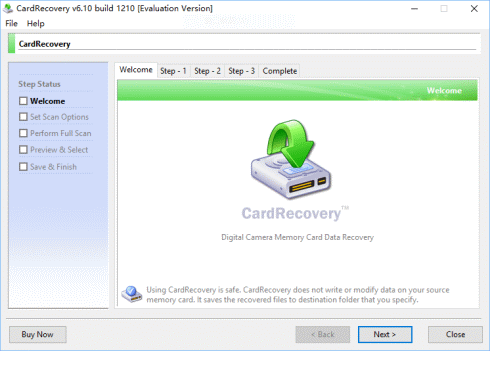
Overview : CardRecovery™ is the leading photo recovery software for memory card used by digital camera.

It can effectively recover lost, deleted, corrupted or formatted photos and video files from various memory cards. It supports almost all memory card types including SD (Secure Digital) Card, CF (Compact Flash) Card, xD Picture Card, Memory Stick, MicroDrive, SmartMedia Card, MMC (MultiMediaCard), MicroSD, MiniSD, SDHC and more.
CardRecovery, the award-winning digital photo recovery software is the reliable solution for digital image recovery, digital picture recovery, digital media recovery, photo rescue, photo restore, data recovery, or whether files were deleted, the storage was damaged or formatted.

Our unique and exclusive SmartScan technology completes those impossible recovery tasks that other software cannot touch -- SmartScan quickly locates and restores files that other recovery software could never find.

Using CardRecovery is safe and risk-free. The software performs READ-ONLY operations on your memory card. It doesn't move, delete, or modify the data on the card to avoid causing further damage or overwriting. It recovers the photos and movie clips from the source memory card and saves them to the destination location you specify.


CardRecovery Features:
Recover deleted photos from memory cards
Recover lost photos from memory cards
Recover lost movies from memory cards
Recover photos from formatted memory cards
Recover photos from damaged, unreadable or defective memory cards
Recover pictures from removable storage including flash drives
Recover images, video files from mobile phones
Supported Storage

Secure Digital card, SD card, SDHC, miniSD, MicroSD (TransFlash) card recovery
Compact Flash card, CF Type I, Type II, MicroDrive, CF card recovery
Memory Stick, Memory Stick Pro, Duo, Pro-HG, XC, Micro(M2) recovery
MultiMedia card, MMC card recovery
SmartMedia, flash card recovery
xD Picture card recovery
Cellular phone, mobile phone memory card and digital media recovery
USB flash drive digital image recovery
Supported Situations


Photos deleted accidentally or intentionally from memory cards
Photo loss due to formatting or "Delete All" operation
Memory card error or damage, or inaccessible memory card
Corruption due to the card being pulled out while your camera is on
Damage due to turning your camera off during a write/read process
Data corruption due to critical areas damage e.g. FAT, ROOT, BOOT area damage
Data loss due to using between different cameras/computers/devices
Other events that could cause damage to data
Supported Photo/Video File Types

Common Picture Formats: JPG JPEG TIF
Common Video Formats: AVI MPG MOV MPEG ASF MP4 3GP MTS
Common Audio Formats: MP3 WAV
RAW Image Formats: Nikon NEF, Canon CRW and CR2, Kodak DCR, Konica Minolta MRW, Fuji RAF, Sigma X3F, Sony SRF, Samsung DNG, Pentax PEF, Olympus ORF, Leica DNG, Panasonic RAW and more
Supported Camera Brands

Nikon, Canon, Kodak, FujiFilm, Casio, Olympus, Sony, SamSung, Panasonic
Fuji, Konica-Minolta, HP, Agfa, NEC, Imation, Sanyo, Epson, IBM, Goldstar
LG, SHARP, Lexar, Mitsubishi, Kyocera, JVC, Leica, Phillips, Toshiba, SanDisk
Chinon, Ricoh, Hitachi, Pentax, Kinon, Verbatim, Vivitar, Yashica, Argus, Lumix
Polaroid, Sigma and almost all digital camera brands in the market
Supported Flash Memory Card Manufacturers

SanDisk, Kingston, KingMax, Sony, Lexar, PNY, PQI, Toshiba, Panasonic
FujiFilm, Samsung, Canon, Qmemory, Transcend, Apacer, PRETEC, HITACHI
Olympus, SimpleTech, Viking, OCZ Flash Media, ATP, Delkin Devices, A-Data
and almost all digital camera memory card brands in the market.

Requirements : Microsoft Windows 98/NT/Me/2000/XP/2003/Vista/7

Download:

http://www.megaupload.com/?d=PSLR6WDI
Please Post Your Suggestions.


Read More!
SpriteClone v6.5.0.16


SpriteClone v6.5.0.16

Overview
: Just like laptops and desktops, cloning represents the most rapid means to deploy corporate applications, security configurations and other policy approved customizations all within a fraction of the time and budget when compared setting up devices manually.

Features:
* Ease and Speed of deployment - Average restore time takes just 3 minutes. Mass deployment via SD card allows you to image 300 consistent devices an hour!
* Multi-Device Support - The only cloning solution for deploying Windows Mobile 5.0, WM6 and WM6.1 operating systems for Pocket PC and SmartPhone
* Ease of Use - Intuitive image Capture and Deployment
* Clone Manager - Configure your clone settings from the comfort of your PC.
* Post-Cloning Configuration - Save time and mistakes by not having to manually apply device specific custom settings including unique device naming, IP address, etc.
* Deploy Anywhere - Leave the image on the SD card. If the user is out of the office all they need do is hard reset the device to trigger a restore
* Create Base Images - For each department e.g. Sales, Warehouse or Job role e.g. Doctors, Nurses
* Consistency - Helps ensure that Windows Mobile devices remain consistent and compliant with corporate standards from acquisition to disposal
* NEW! White-Label Support - Fully customizable interface in order to support private labeling by System Integrators, VARs, other software vendors, or OEMs

Requirements : WM5, WM6/6.1

Download:

http://rapidshare.com/files/295215678/SpriteClone.v6.5.0.16.Retail.ShareFree.rar
http://www.uploadjockey.com/download/2891455/SpriteClone.v6.5.0.16.Retail.ShareFree.rar
http://www.megaupload.com/?d=K1VRCYWW
http://www.ziddu.com/download/6984889/SpriteClone.v6.5.0.16.Retail.ShareFree.rar.html
Please Post Your Suggestions.


Read More!
Raspberry Software True Connect Pro v3.0.4.0


Raspberry Software True Connect Pro v3.0.4.0

Overview : True Connect is an exciting new way to control your Windows Mobile device when its plugged in! Simply drag your mouse off the side of your monitor, and it appears on your phone. Now you can click on the menus, controls and applications in an intuitive, natural way. It even works for non-touch screen devices! Of course, you can also use the PC keyboard to type, copy and paste information.

Can't see your device screen without holding it up? No problem - just use On-Screen Connect to show your device screen on your PC. It slides in when you need it, tucking neatly out of the way when you don't.

New to version 3.0 is SMS Text Messages in Microsoft Outlook. Read, send, forward and manage your text messages just like your email.

Requirements : Windows Mobile 2003SE and above, Microsoft W2K/XP /Vista. (True Connect SMS supported with Outlook 2003/2007 on XP/Vista)

Download:

http://www.megaupload.com/?d=3U476KNG
http://rapidshare.com/files/274710171/Raspberry.Software.True.Connect.Pro.v3.0.4.0.rar
Please Post Your Suggestions.


Read More!
Birsi MobileController Professional v1.72.090730


Birsi MobileController Professional v1.72.090730

Overview
: MobileController is a new product which integrates computer and mobile phone together. And it will make your handset much more powerful! MobileController is your best assistant anytime you need it, such as remote controlling, text chatting, photo transferring, virtual camera and business presentation.

Here are some key features of "MobileController Professional":

Real-time Control and Display:
· Synchronized phone screen, mouse is a touchpen, PC keyboard is equal to that of the mobile

SMS Service:
· Send messages by desktop. Pick up the contact simply. Pop-up reminder for new messages

System Information Display:
· Display operation system version, screen resolution, color depth, physical memory, disk space and battery status, etc

Presentation Tools:
· Selection of skins, remote operational experience, three –direction screen support, enlargement or reduction of screen, switchable background images, everything makes you convenient to operate

Mobile Device Reset:
· Soft and hard reset mode for the mobile device. Please note that hard reset will restore a mobile device to its original factory default settings

Screen Capture:
· Capture the device screen and save to clipboard in JPG, BMP, PCX or PNG format, with or without graphic marks and skin

Intelligent Photo-Transmission:
· Use “My Pictures” as the default folder to save photos. Adjust picture size automatically based on the phone screen with smallest memory and best quality

Allows multiple connection methods:
· As well as ActiveSync, you can connect a mobile device through TCP/IP, such as Wifi, 3G and etc

Virtual Webcam:
· There is a virtual webcam on the desktop. It is synchronized with the phone screen and can be useful for distance teaching and video chat!

Task Management:
· Display internal processing, foreground applications state and kill or activate the process

Drawing Tools:
· Graphic marks is to mark some area of the screen. Support for color selection and eight tools of curve, line, circle, filled circle, ellipse, filled ellipse, rectangle, filled rectangle

Clipboard Synchronization:
· Synchronize PC clipboard with the mobile device by setting. Support Unicode format

Screen Printing:
· Print the mobile screen images with or without skins and marks. Support preview and printer settings

CAB Installation:
· Run CAB setup selecting by a dialog or dragging CAB into the window

Requirements : WM5, WM6, WM2003

Download:

http://rapidshare.com/files/264760954/Birsi.MobileController.Professional.v1.72.090730.rar
http://www.megaupload.com/?d=K5XVCRQD
Please Post Your Suggestions.


Read More!