Home » Android Apps
Sygic: GPS Navigation v14.3.2


Sygic: GPS Navigation v14.3.2


Overview :THE MOST DOWNLOADED OFFLINE NAVIGATION APP IN THE WORLD!

HIGHLIGHTS
➤High quality TomTom maps stored on the phone
➤Works with GPS only, internet is not needed
➤Turn-by-Turn voice guided navigation
➤Spoken Street Names to focus on the road
➤Three Alternative Routes to choose from
➤Waypoints for places you want to visit
➤Dynamic Lane Guidance to know the right lane
➤Junction View to understand intersections
➤Speed Limit Display to protect your wallet
➤Speed Camera Warnings for Speedy Gonzales
_______________________________________
BENEFITS
➤Free Updates: maps, premium POI, speed cams
➤3D Cities & Landscape for easy orientation
_______________________________________
SAFETY AND USER COMFORT
➤Sharp Curve Warnings for added safety
➤Notification of Upcoming Speed Limit Change
➤Avoid Toll Roads on part or on entire route
➤Avoid Roadblocks, Motorways …
➤Pedestrian Navigation to walk and explore
➤Compass & Stopwatch for outdoor activities
_______________________________________
SYGIC PLACES
➤Exclusive POIs as free download in My Sygic
➤TripAdvisor, Booking.com & many more
_______________________________________
GREAT SEARCH
➤Google™ Local Search to find anything
➤Find and Navigate to
· Address
· Contact
· POI
· Postal code
· Intersection
· GPS coordinates
· Geo tagged photo
· Home
_______________________________________
APP THAT IS PERSONAL
➤Import of interesting locations - POIs
➤Customizable navigation screen
➤Road Incident Sharing with other drivers
➤SOS/Help to find assistance nearby
➤Customizable spoken warnings
➤Friends on the map
_______________________________________
COMPATIBLE TO THE MAX
➤Smooth Hardware Accelerated 3D rendering
➤Car Audio Integration – Bluetooth or cable
➤Graphics optimized for tablet & HD displays

This app has NO advertisements

Requirements : 2.0.1+

Download:
http://ul.to/nxidngpn

Mirror:
https://www.oboom.com/Q499IQLU
https://www.filemonkey.in/file/mwgkg3dibtxe8a6p

Instruction:
1. Copy Sygic folder to root SD
2. Add maps. voice,...
3. Install APK

BASEFILES:
http://ul.to/jch1fnq3
http://ul.to/02mx5rqr

https://www.oboom.com/I5ZZ0Z45
https://www.oboom.com/JZSPF9MN

https://www.filemonkey.in/file/r9stsqao8uwkohhr
https://www.filemonkey.in/file/n9uxz4f51tk36xix


Please Post Your Suggestions.


Read More!
OfficeSuite Pro 7 (PDF & HD) v7.3.1543


OfficeSuite Pro 7 (PDF & HD) v7.3.1543

Overview : The world’s No. 1 mobile office today!

# Installed on over 100 million devices in more than 205 countries
# Over 40,000 registrations per day
# No. 1 app in Google Play Business category

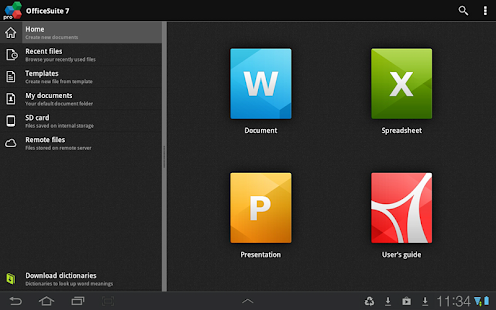
Made by MobiSystems, OfficeSuite Pro allows you to view, create, edit, print and share Word, Excel and PowerPoint files on the go. You can also open attachments and see PDF files on an Android based phone or tablet with our feature-rich mobile office solution.

OfficeSuite Pro includes a File Browser and integration with Cloud service leaders: Box, DropBox, Google Drive, SkyDrive and SugarSync to give users a multitude of options on how to manage files and attachments.

---OfficeSuite Pro 7 Out Now! New Features---

* New and improved UI
* Side bar navigation in the File Browser for quick access to different folders and remote third party cloud services
* Templates - OfficeSuite Pro 7 users can benefit from a wide range of templates, from Resume and Invoice templates to Travel Planner and Weight Loss Tracker templates, among others
* Extended Cloud support - now compatible with Microsoft SkyDrive. Google Drive support has been improved, by adding folder support, thus allowing for optimized document view

Docs Editor:
* Styles - apply MS Word styles or styles used in the document
* Table design – ability to fashion an inserted table as per our library of tailor-made designs
* Formulas (display only)
* Format painter

Spreadsheet Editor:
* Improved selection of parameters in functions

Slides Editor:
* Animations

PDF Viewing:
* A new PDF engine using library from Adobe, providing instant opening of large PDF files
* Find/Find Next

--File Formats Supported--
* Text format - DOC, DOCX, DOCM, RTF, TXT, LOG
* Spreadsheet - XLS, XLSX, XLSM, CSV
* Presentation - PPT, PPTX, PPS, PPSX, PPTM, PPSM
* Other formats - PDF, EML, ZIP

--Easy File Access and Sharing--
* With the integrated File Browser you can easily access, modify and share your local or Cloud stored files. OfficeSuite integrates with Google Drive, DropBox, Box, SugarSync and SkyDrive
* Easily open email attachments
* Work with Outlook EML files
* Share documents via Email or Bluetooth

--Intuitive and Intelligent Design--
* OfficeSuite 7 comes with new intuitive design and user experience allowing quick and intuitive workflow while you manage your files or create and modify documents.
* New side bar gives instant access to local and cloud stored files.
* Two-finger zoom, multi-touch support, context toolbars and popup menus make your work with OfficeSuite quick and fun.

--OfficeSuite Extensions--
* QuickSpell – fully integrated with OfficeSuite Pro QuickSpell will help you dramatically improve your typing accuracy.
* Font Pack – allows you to use Microsoft most used fonts in OfficeSuite text documents.
* Note that OfficeSuite Extensions are sold separately. Purchasing any of the extensions is optional.

Compatible with Sony Ericsson LiveDock™ Multimedia station.
com.sonyericsson.extras.ATTACHED

How OfficeSuite uses the granted permissions on your phone - http://www.mobisystems.com/android_offi ... ermissions

What's New
Version 7.3.1543
* Optimized for Sony Smartwatch 2

This app has NO advertisements

Requirements :2.2 and up

Download:
http://ul.to/jq17l70c

Mirror:
http://extabit.com/file/29jcm0rf1ppya


Please Post Your Suggestions.


Read More!
SwiftKey Keyboard v4.3.1.231


SwiftKey Keyboard v4.3.1.231

Overview :1 selling app in 38 countries, over 70,000 ✮✮✮✮✮ reviews
Winner of Webby Award & Global Mobile Award for Innovation
A Fast Company Top 10 Most Innovative Mobile Business
The only true multi-lingual keyboard - type in up to three languages simultaneously

“Shockingly accurate, making for a creepy-fast typing experience.” - TIME Magazine
“I can’t recommend SwiftKey highly enough.” - CNET

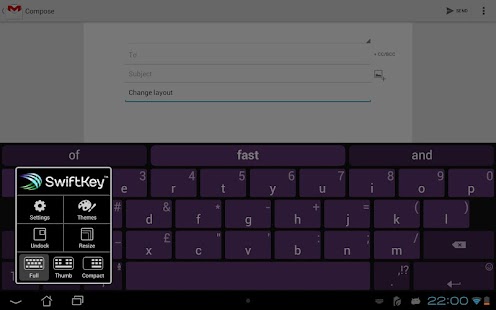
SwiftKey replaces the touchscreen keyboard on your phone with one that understands how words work together, giving the world’s most accurate autocorrect - and predicting your next word before you press a key.

The keyboard learns as you use it to make corrections and predictions based on the way that you write. It can even learn from your Gmail, Facebook, Twitter or blog to make its insights even more personalized. You can also enable up to three languages simultaneously, for true multi-lingual typing.

Switch seamlessly between tapping and gesture typing with our new SwiftKey Flow feature. It combines the mind-reading capabilities of SwiftKey with the speed of gliding your fingers across the screen. With ‘Flow Through Space’, you can also enter entire phrases without lifting your finger from the screen, simply by sliding to the space bar between words.

For video tips and support, visit http://www.swiftkey.net/

Language support (enable up to three at once):
English (US)
English (UK)
English (AU)
Afrikaans
Albanian
Arabic
Armenian
Azerbaijani
Basque
Bosnian
Bulgarian
Catalan
Croatian
Czech
Danish
Dutch
Estonian
Finnish
French (CA)
French (FR)
Galician
Georgian
German
Greek
Hebrew
Hindi
Hinglish
Hungarian
Icelandic
Indonesian
Irish
Italian
Javanese
Kazakh
Korean
Latvian
Lithuanian
Macedonian
Malay
Norwegian
Persian (Farsi)
Polish
Portuguese (BR)
Portuguese (PT)
Romanian
Russian
Serbian
Slovak
Slovenian
Spanish (ES)
Spanish (US)
Spanish (LA)
Sundanese
Swedish
Tagalog
Thai
Turkish
Ukrainian
Urdu
Vietnamese

What's New :
Switch to choose to show numpad on the left or right on secondary layout -
Fixed loss of personal language when you upgrade
Restored missing dollar sign
Spacebar sound is now different to other keys
See more at http://support.swiftkey.net/knowledgebase/

This app has NO advertisements

Requirements : Android 2.2+

Download:
http://ul.to/2gl1hpa9

Mirror:
http://clz.to/jh9twxny
http://rapidgator.net/file/2e11b3bde4832e254393344b610aab34s


Please Post Your Suggestions.


Read More!
Titanium Backup Pro v6.1.4.1


Titanium Backup Pro v6.1.4.1


Overview :Titanium Backup is the most powerful backup tool on Android, and then some.

☆Needs ROOT, Android 1.5-4.4+ (ARM,x86,MIPS)
☆Over 11 million users, 30+ languages.
☆PRO Key is available on Play Store!
☆Voted #1 TOP ROOT APP on Twitter.
☆Problem? See titaniumtrack.com/kb
☆Scroll down for more info & DEMO VIDEOS ;-)
☆ ☆ ☆
Titanium Backup is the most powerful backup tool on Android, and then some.
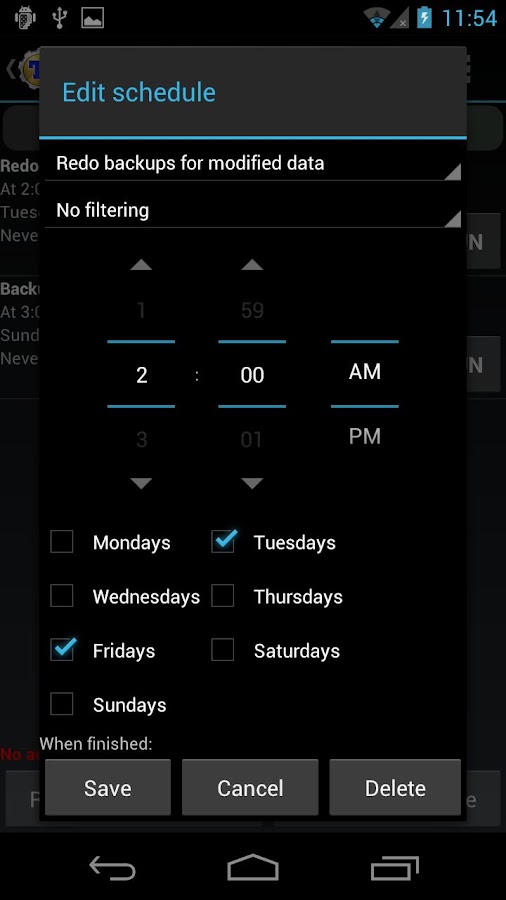
You can backup, restore, freeze (with Pro) your apps + data + Market links. This includes all protected apps & system apps, plus external data on your SD card. You can do 0-click batch & scheduled backups. Backups will operate without closing any apps (with Pro). You can move any app (or app data) to/from the SD card. You can browse any app's data and even query the Market to see detailed information about the app.
Also see the paid PRO key which adds EVEN MORE awesome features such as:
[✔] 0-click batch restores
[✔] Keep multiple backups per app
[✔] Backup/restore SMS,MMS,calls,bookmarks,Wi-Fi AP as XML
[✔] Multi-user app data
[✔] Apps freezer
[✔] Sync to/from Dropbox (manual/scheduled)
[✔] Sync to/from Box (manual/scheduled)
[✔] Sync to/from Google Drive (manual/scheduled)
[✔] TB Web Server: download/upload your backups as a single ZIP on your computer
[✔] Convert user apps <=> system apps
[✔] Integrate system app updates into ROM
[✔] Encryption
[✔] Market Doctor (relink apps to Market)
[✔] "Destroy all Market links" feature
[✔] Hypershell speed
[✔] Backup apps without closing them!
[✔] Create your own update.zip containing apps+data!
[✔] Restore individual apps+data from non-root ADB backups!
[✔] Restore individual apps+data from CWM backups!
[✔] Restore individual apps+data from TWRP backups!
[✔] Market "auto updating" manager
[✔] Dalvik cache cleaner
[✔] Integrate Dalvik cache system elements into ROM
[✔] Unlimited schedules
[✔] Load/Save a Filter and use it in Widgets/Schedules
[✔] Change the device's Android ID, restore it from a backup or after a factory reset
[✔] Protect backup against deletion
[✔] Send backup (to e-mail/cloud) and import it in 1 click
[✔] Backup→Verify→Un-install an app in one shot
[✔] Freeze/defrost/launch apps in a single click
[✔] CSV export any app DB (e-mail or Google Docs)
[✔] Convert app data to/from fast WAL format
[✔] WAY MORE!
Check out this in-depth review of TB PRO:
http://youtube.com/watch?v=vuvDTS9RDrM&hd=1
And check out the new TB PRO demo video:
http://youtube.com/watch?v=YU33zabluSY&hd=1
Here's the older TB demo video:
http://youtube.com/watch?v=pZdqITHxCsM&hd=1
More info on permissions:
• "Internet" is used to access Market,Dropbox,ChangeLog.
• "Accounts" is used to access Market.
Some advice:
• We recommend to avoid "modified" TB versions because they can cause various problems down the road.

What's New
• Added initial support for ART runtime on Android 4.4 (KitKat).
• Updated translations.

Release info:
1. First uninstall previois patched version if you alreay installed it
2. Install Titanium Backup (Dont' run!) & Lucky Patcher
3. Use Lucky Patcher's custom patch (choose "use com.keramidas.TitaniumBackup") to patch Titanium Backup
4. Enjoy

This app has NO advertisements

Requirements : 1.5 and up, Lucky Patcher

Download:
http://www.kingfiles.net/6bfj0wpjmvjc/Titanium_Backup_6.1.4.1.rar

Mirror:
http://www.tusfiles.net/xbry5djxv4hb
http://ul.to/1qqth02e
http://unlimitzone.com/fgscvfbdhqjn/Titanium_Backup_6.1.4.1.rar.html


Please Post Your Suggestions.


Read More!

AirDroid v2.0


AirDroid v2.0

Overview :AirDroid is a fast, free app that lets you wirelessly manage & control your Android device from a web browser Over-The-Air.

Your Android, on the Web
AirDroid is a free and fast app that helps you manage your Android from a desk web browser, all over the air.
AirDroid philosophy:
※ One less cable.
Move things on and off your Android device without a USB cable. Even when the device is not nearby.
※ One less screen.
Send and receive SMS from your big-screen computer, without being distracted by the small-screen thing.
※ One less worry.
Locate and lock your Android when it’s lost. Cannot get it back? Simply wipe all data remotely.
Media coverage:
※ “This app allows you to take complete control of your Android device via your computer's Web browser.” - PCWorld
※ “I'm sending text SMS messages from my Android phone via my browser. I can't stress how great that is.” - Gizmodo
※ “It's a remarkably comprehensive app, operates securely, and is a free download.” - Lifehacker
※ “It's all the little things, the things that make AirDroid a joy to use, which make it the app of the year.” - Android Police
Key features:
※ Desktop SMS
Send & receive SMS from the comfort of your computer. Faster typing and navigation with the full keyboard and large screen.
※ Files and Media
Move photos, videos, ringtones and any other files on and off Android, all without a USB cable.
※ Find Phone
Locate and lock your Android when it’s lost. Cannot get it back? Simply wipe all data remotely.
※ Manage Apps
Easier way of app search, installation and apk export.
※ Camera and Screenshot
See through the lens of your Android camera, front and back. Or stream the screen of your Android in nearly real-time.
※ Phone Calls, Clipboard , Url transfer and more
Call contact, share clipboard content, push url to Android and more features awaiting your discovery.

What's in this version:
1. Device-free (lab). Sign in on the web and AirDroid will launch automatically on the device, even when it’s not nearby.
2. Same-network-free. No more same WiFi network restriction. Access AirDroid through different network with an AirDroid account.
3. Find Phone. Locate your device on a map. Lock it or wipe all data options.
4. Call notification and initiate new call on your Android device.
5. Remote camera.
6. Improved SMS, Photo and File experience.
7. Many other bug fixes and improvements.

Requirements : Android 2.1+

Download:
http://ul.to/hi6d6jyg

Mirror:
http://www.secureupload.eu/qf9l865fwuay/com.sand.airdroid-50-v2.0.apk
Please Post Your Suggestions.


Read More!
SlideIT Keyboard v6.0


SlideIT Keyboard v6.0

Overview :SlideIT is the best keyboard for Android devices.

The best Android keyboard for quick and easy writing.

SlideIT keyboard is an excellent tool for entering text, replacing your touchscreen keyboard. SlideIT keyboard enables users to dramatically improve writing speed with practically no learning curve.

Instead of entering text by tapping on the keyboard letters, SlideIT keyboard eases texting by sliding a finger along the keyboard letters, while the words “magically” appear on the screen.

SlideIT keyboard version 5.1 includes many new features and fixes.

++ NEW!! SlideIT 5.1 now supports Korean with 2 different layouts! ++

Many keyboard skins for SlideIT are available for free download from the Android Market.

SlideIT keyboard fully supports all Android versions from 2.0 (Eclair) and up, including tablets and Android 4.2 (Jelly Bean).

With over 6,000,000 downloads, SlideIT keyboard has been an Android bestseller and selected as an editor's choice by Google.

Among SlideIT's great features:
- Smart predictions and disambiguation
- Over 70 language packs and layouts
- More than 60 skins
- Speech-to-text
- Keyboard customization
- Import contacts from your phone

SlideIT's many great features make it the ultimate time-saving keyboard for Android devices. Writing e-mail, SMS messaging or just chating with your friends on a small touchscreen is now easy and fun!

What's in this version : (Updated : Mar 18, 2013)
Next-Word Prediction plugin
Better sliding recognition
Better word completion
Better mistyped word correction
New Next word prediction suggestions
10 new Unicode Dynamic symbols layouts
Basic, Extra, Useful, Game, Arrows, Math, Currency, and Emoticon symbols . . .
Arrow Keys
Floating popup or docked to keyboard
Text navigation using volume keys
Keyboard Entrance/Exit Animation
Sliding trail appearance
Popup on keypress
English UK / US

This app has no advertisements

Requirements : 2.0 and up, Lucky Patcher

Download:
http://rapidgator.net/file/b96e0e74fe09015a76b7408745ecd9bc/
http://uploaded.net/file/7r9ofa6t

Install and run with Modded Google play by ChelpuS or
Remove license verification with Lucky Patcher


Please Post Your Suggestions.


Read More!